
Where should your AI agent live? Copilot Studio, Foundry or code
Choose between Copilot Chat, Agent Builder, Copilot Studio, Microsoft Foundry and custom code, with practical examples, cost comparisons and six questions to guide your decision.
In summary
Configure where you can, code where you must, and build the plug once. A practical guide to choosing between Copilot Chat, Agent Builder, Copilot Studio, Microsoft Foundry and your own application on Azure, with worked costs, six decision questions and reusable business tools.
Key takeaways
- Choose the simplest option that meets the functional, security and operational requirements.
- Use deterministic checks for hard business rules, whichever agent platform calls them.
- Compare licences, model use, hosting, engineering and support rather than token costs alone.
- Expose reusable business capabilities through secured MCP tools or APIs.
Sources referenced
Decide where your AI agent belongs
Talk through your use case, integration needs and business rules with Scorchsoft.
Watch: where should your AI agent live?
A 29-minute guide to the five options, their costs and the reasons to choose each one.
Read the transcript
Narrator: Five ideas for AI agents. Where should each one live? If your organisation runs on Microsoft, there are five places to choose from, and most of them have been renamed at least once in the last two years.
Narrator: Perhaps you've been asked to do agents, and to justify where. Someone has said Copilot Studio is the answer; someone else, that the developers should just build it in Python. And you're worried about picking wrong, a bill nobody forecast, something private leaking, and Microsoft renaming the lot next month. By the end, you'll be able to take any agent idea and say where it should live, what it'll cost to run, and what would make you move it. On the way: a map of how the pieces fit, a ladder of the five places, six questions that put each agent on its rung, then hybrids, who runs them, and where code earns its place. Hayley's five notes come with us.
Narrator: One promise first. There's no favourite place in this film. Each of the five suits some agents and not others, and for many agents, code is the wrong call. We'll say which is which as we go. Here's the short answer, which the rest of the film earns. Configure where you can. Code where you must. And build the plug once.
Narrator: Our example: Pritchard Group, an invented company that maintains forty thousand rented homes across the north of England. Twelve hundred staff, Microsoft 365 E3 with some Copilot licences, Azure through an MSP, and Fabric for its reports. Hayley, its head of operations, also invented, wrote the five notes.
Narrator: So what is an agent? It's AI set up to do one job, and every agent has six parts. A brain: the model, such as GPT or Claude, that reads and writes. A brief: its instructions. Knowledge: the documents and data it can look things up in. Hands: tools that let it do things, like opening a ticket or booking a slot. A harness, which we'll come to. And a front door: where people meet it, in Teams, on your website, or nowhere at all when it works in the background.
Narrator: The harness is everything around the model that keeps it on the rails: who it runs as, what it may touch, the rules checked before anything happens, the approvals, the retries, the logs. You'd expect the model to matter most. But in Microsoft's own internal tests of one of its agent tools, changing the model made little difference to how often agents completed their test tasks, while changing the harness made a substantial one. And the more an agent does on its own, from answering, to acting, to running when nobody asked, the more the harness matters.
Narrator: Before the options, a map. Most of the confusion comes from mixing up layers, so picture the Microsoft estate as five, stacked. At the top, the front doors: Teams, Copilot, your website. Then the places an agent is configured. Then the models. Then tools and data. And underneath everything, identity and governance. This film is mostly about the second layer, but every choice there leans on the others.
Narrator: Here are the names that matter, in plain English. Entra is the company directory, formerly Azure Active Directory: every person, app and now agent has an account there, and every service checks it first. An Azure subscription is the bill for what you run in Azure; if your MSP resells it, it may be a CSP subscription, which matters later. Dataverse is the database behind Microsoft's low-code tools. Fabric holds the agreed definitions of your numbers. Foundry is Azure's home for models and agents: yes, the one whose label won't stay stuck. And MCP is an open standard plug that lets any agent use a tool.
Narrator: Identity decides what an agent can see. Microsoft's built-in agents work on behalf of the person asking, so they only see what that person could already open. That's a strength: you don't rebuild permissions. It's also a trap. If your SharePoint permissions are loose, an agent will find what was always technically visible. In a 2024 Gartner survey, forty per cent of IT leaders had delayed Copilot by three months or more over oversharing. An agent with its own identity, like your own code, sees only what it's been granted, so that has to be designed on purpose.
Narrator: Now the five places an agent can live, as a ladder. Every rung supplies the same six parts. The question is who builds them, and above all, who builds the harness. On the bottom rung, Microsoft builds almost everything and you write the brief. At the top, you build it all. Each step up gives more control, asks for more skill and changes how you pay. Foundry and your own code overlap, because Foundry can run your code.
Narrator: Below the ladder sit two options people forget. Don't use an agent: Microsoft's own guidance says fixed steps with strict rules are faster, cheaper and more reliable as ordinary code, and a plain question-and-answer over a fixed set of documents needs only a simple look-up, not an agent that acts. Or buy one: Researcher and Analyst, which come with the full Copilot licence, Fabric's data agents, and the agents in Dynamics 365. Check what your licences include before you build.
Narrator: Rung one: Copilot Chat, included with Microsoft 365 business and enterprise plans. On its own, it works from the web, its instructions and whatever the user gives it. If your admin switches on pay-as-you-go billing, agents built for it can also read SharePoint, charged per use. The full Microsoft 365 Copilot licence, thirty dollars a user a month, adds each person's own mail, chats and meetings. It's brilliant for personal work, but it can't reliably share a configured behaviour across a team, or act in your systems. Many E3 organisations start here. Pro tip: a shared Copilot Notebook, with standing instructions and pinned files, is the cheapest team agent there is.
Narrator: When do you climb from rung one to two? Picture Shona, a housing supervisor, also invented. Her twelve officers each keep their own copy of the lone-working prompt. Last week, one copy had lost the line about ringing the duty manager after nine at night. Same question, twelve slightly different answers. That's the signal: a team needs the same instructions and the same files, every time. Stay on rung one while it's one person's habit, or while a shared prompt or a shared Notebook covers it.
Narrator: Rung two: Agent Builder. Inside Copilot, someone gives an agent a name, instructions, starter prompts and knowledge, such as a hundred SharePoint files. Microsoft calls these declarative agents: you declare the brief, and Copilot supplies the brain and the harness. It's ideal for the policy helper: fast, owned by the business, and its SharePoint knowledge only shows people what they can already open. Staff with a Copilot licence pay nothing extra; for everyone else, an agent that reads SharePoint is billed per use, which we'll come to. Hayley's lone-working policy question goes here.
Narrator: Know its limits. It can't use tools that change other systems, run sequences of steps, or sit on your website, and files uploaded straight into it are visible to everyone who can use it. Pro tip: write the instructions like a short spec, then test the agent against plain Copilot. If its answers are no better, you've built a very polite bookmark.
Narrator: And from two to three? Gareth runs the IT helpdesk. His Agent Builder agent sorts out 'my laptop won't connect' well, then sends people to the portal to raise a ticket, where they type it all again. Tickets still arrive without the site or the asset number, so his team rings back anyway. Climb when the agent needs to do something in another system, ask its questions in a set order, or start without being asked. Stay on rung two if most questions end in an answer, and a link is enough for the rest.
Narrator: Rung three: Copilot Studio. Think of it as a web designer for agents. You add knowledge; tools, from ready-made connectors to MCP servers; agent flows, which are fixed sequences of steps; and triggers, which start an agent when something happens. It publishes to Teams, Copilot, a website or a contact centre. And here the harness becomes a choice: a standard one where you script guided conversations, the Microsoft Copilot harness, which plans its own steps and bills by usage, and, in preview, one for customer service.
Narrator: It's very good at staff-facing agents that do things, like helpdesk triage that opens a ticket. It's owned by the people who know the process, governed in ways IT already understands, and more testable than its reputation: built-in evaluation since March 2026, and release pipelines from test to live. Hayley's helpdesk triage goes here.
Narrator: Where does it strain? Complex or fast-changing rules, high volume and, practitioners report, latency and little visibility into why an agent did what it did. It's paid for in credits, a cent each: a generative answer is two, and looking it up in your own data adds ten. Staff with the full Copilot licence, using an internal agent as themselves, aren't charged on the standard harness, except when the agent runs on its own. Two traps. Reasoning models, which think in steps first, use far more credits: in Microsoft's own example, one question to a website agent costs about one dollar forty to four dollars sixty. And go a quarter over your prepaid credits, and agents stop mid-conversation, unless pay-as-you-go is linked.
Narrator: Past rung three, the pain sounds different. Pauline, the finance director, piloted invoice checking in Copilot Studio. Then the auditors asked why one invoice was approved. The transcript showed what the agent did, but the price tolerance was a sentence in its instructions, so nobody could prove it was applied. Six thousand invoices a month made the credits hard to forecast. The signal: a rule that must always hold, a record an auditor can follow, and tests on every edge case. That's code, which Foundry can run for you. If only one step is hard, keep the conversation in Copilot Studio and put that step behind a tool.
Narrator: That's the Microsoft-built half of the ladder. The top two rungs are where you start building the harness yourself, and where models and contracts start to matter. Rung four: Microsoft Foundry, Azure's catalogue of models and its agent service. You can define a prompt agent in the portal with no code, or hand Foundry your own code, packaged up as a container, as a hosted agent, with its own identity, a record of every step it takes, and tests. It suits teams that want Azure's security and monitoring without running servers, and model choice on one bill.
Narrator: Where it strains is churn. The first generation of its agent service retires in March 2027, and its workflows feature on the first of December. Some parts are still in preview. And you pay per token, the word-pieces a model reads and writes, plus compute for hosted agents. OpenAI's everyday model on Azure costs about a dollar per million tokens in, and five out; the top model, ten and fifty.
Narrator: Which models can you use where, and under whose contract? OpenAI's GPT models are the default almost everywhere. In Foundry, Microsoft sells them on its own terms, and they can stay in a European data zone, a group of regions where the processing stays, which UK organisations can choose too, for about ten per cent more. In Copilot Studio the default model updates itself, and pinned models retire quickly: three in October, and five more on the twelfth of November.
Narrator: Claude is the interesting one: it's in both places, under different contracts. In Copilot and Copilot Studio, Anthropic is a Microsoft subprocessor, so Microsoft's terms apply, but it's outside the EU Data Boundary and off by default in the UK and EU until an admin turns it on. In Foundry, Anthropic is the data processor, on Anthropic's own terms, even when it runs on Azure. Its only data zone there is the US, and it isn't available on CSP subscriptions at all. Same Claude, different contract. A legal sign-off for one doesn't cover the other.
Narrator: Rung five: your own application on Azure. Your developers write the agent in Python or TypeScript, with a toolkit, or SDK, from OpenAI, Anthropic or Microsoft. It runs on Azure, behind your website or inside Teams, and usually calls its models through Foundry, so it stays on your Azure bill with no keys in the code. This is where hard rules live. 'Match every invoice to its purchase order, and pay nothing over five thousand pounds without a manager's approval' becomes code that runs every time, not an instruction the model usually follows. A prompt can ask. Code can make sure.
Narrator: Between rungs four and five, the question is the product around the agent. Imran, the digital manager, tried the tenants' repair booking as a Foundry prompt agent. The answers were fine. The hard part was everything else: Pritchard's own pages, live slots from the repairs system, and a booking made exactly once, even when a tenant on a slow phone taps 'confirm' three times. What tips it: the agent is one part of a service you build and run. Stay on rung four if the agent is most of the job, and a tool your developers write can make the booking.
Narrator: Code also gives you approvals, retries and doing things exactly once, built as ordinary software; customer-grade experiences; and the freedom to swap models. The cost is that you own everything Microsoft would otherwise run: sign-in and permissions, security, hosting, monitoring, upgrades, and toolkits that change every month. Hayley's invoice checking goes here, as a hosted agent in Foundry, and so does the tenants' repair booking.
Narrator: So how do you choose a rung? Ask six questions of one agent doing one job: who meets it; what must never go wrong; where its data lives; how much it runs; which model it needs; and who owns it.
Narrator: Who meets it? If it's your staff inside Microsoft 365, start low: they're signed in, permissions come free, and the front door already exists. If it's customers on your website, Agent Builder can't do it, Copilot Studio can, and a product-grade experience usually means code. That's Hayley's repair booking. What must never go wrong? Put judgement in the model, and rules in something that behaves the same every time. If a mistake costs money, breaks a policy, reaches a customer or changes a record, the check belongs in a flow step at least, and in code when the rules are complex or the stakes are high. That's the invoice checking.
Narrator: Where does the data live? Documents in SharePoint: the lower rungs handle them natively, permissions intact. Records in Dataverse: Copilot Studio is at home. Numbers in Fabric need a semantic model first, an agreed definition of what 'overdue' means, and then a Fabric data agent you can surface in Copilot. That's Hayley's overdue repairs: use the ready-made data agent, with the Fabric service she already pays for, rather than build one. And data scattered across systems needs a search index you control, or code.
Narrator: How much will it run, and who pays? Developers often say tokens are pennies, so code must be cheaper. Microsoft charges three ways. Seats, a licence per person, pay for people using Copilot all day. Credits pay for conversations with agents: cheap for light internal use, steep with reasoning models or high volume. Tokens pay for the model's work directly. And here's the catch: credits include the model, but tokens don't include the engineering.
Narrator: Take Microsoft's own example: a website support agent handling twenty-seven thousand conversations a month. In credits, that's about two thousand dollars a month. In code, the model costs less, but on our estimates, once you add hosting and a few days a month of upkeep, code costs more, and never pays back a build of thirty to sixty thousand dollars. At two hundred thousand conversations on an everyday model, credits reach thirteen to sixteen thousand dollars a month; code saves about six and a half thousand, and repays its build in five to nine months. Put the top model in the code, though, and the tokens alone can cost as much as the credits. Volume and model choice, not cleverness, move the line.
Narrator: Which model, and on what terms? If the default is fine, every rung works; if you need a particular model, or processing in the UK or EU, check the small print first. And who owns it? A business team that wants to change the wording itself belongs low, inside guardrails IT sets. A development team that tests every change belongs higher up.
Narrator: So, the rule of thumb. Pick the lowest rung that passes all six questions, and climb only when one forces you to: a rule that must always hold; customers rather than staff; volume that makes credits expensive; a model or contract you can't get lower down; or a team that tests every change like software. Microsoft's own advice is similar: when you're torn, give each option a one- to two-week trial, and if the low-code one meets your functional and security requirements, use it.
Narrator: There's an opposite pain, too. Picture Dean, a developer, building the lone-working helper in code, because code is what he knows. Six months on, it has its own security review, its own hosting bill, and someone on call. Each policy change waits for Dean. And staff still ask Copilot first, because that's where they already are. On rung two, the policy would be a file Shona's team updates. The signal for coming down: the people are staff, the job is answers, and the rules are simple. Climbing has a cost, so make each step earn it.
Narrator: That's one agent. Most organisations end up on several rungs at once, and the best designs join them on purpose. The most useful join: when two or more agents need the same ability, build the plug once. Put a business capability, like 'book a repair', behind one MCP server on Azure, secured with Entra, with API Management in front, a gateway like a reception desk. Then Copilot Studio, Foundry, your own code and tools like Claude can all use it: Pritchard's helpdesk agent and the tenants' website can share one 'book a repair' plug. Design it around tasks, not one tool per API call. It's useful whichever platform wins, and it survives a change of mind.
Narrator: The other joins. A Microsoft front door with code behind it: Copilot Studio holds the conversation in Teams, and hands the hard part to an agent you wrote, using the agent-to-agent standard, A2A. The business owns the words; engineers own the logic. Or Foundry for models and identity, and code for the work: one Azure bill, and no keys in the code.
Narrator: And the path most people get wrong. A common assumption is: prototype in Copilot Studio, then rebuild it in code. In our experience, most staff-facing agents can stay where they started, and that's a good outcome. When a reason to move up appears, the next step is usually a hybrid: keep the conversation in Copilot Studio, and move the hard part behind an API, an MCP server or a Foundry agent. A full move into code comes last. And what carries over is what you built outside the platform: your test questions, your tools, and your data work.
Narrator: One last question before the answer: who runs all this once it's live? In most organisations like Pritchard, the MSP already runs what every agent depends on: licences, environments, data-loss policies, the subscription. So ask them first. Who can build agents, and with which connectors? Who can share an agent with everyone? Is the subscription CSP, which rules out Claude in Foundry? And will they support an agent built in code, or only its hosting?
Narrator: Wherever an agent lives, a few habits decide whether it works. Write thirty to fifty real test questions with agreed answers before you build, and run them on every change. Ask a person before anything that can't be undone. Treat what agents read as untrusted: in 2025, a flaw called EchoLeak showed one crafted email could make Microsoft 365 Copilot leak data, with nobody clicking anything. It's fixed, but the lesson stands. And give every agent an owner, an identity and a place in the register, which is what Agent 365 is for.
Narrator: Two governance pro tips. If you can't fix every SharePoint permission before launch, a setting called Restricted Content Discovery hides your riskiest sites from Copilot without changing who can open them. And a pay-as-you-go budget only sends an email; the spending reads it and carries on. Set a limit on each agent too.
Narrator: Before the answer, the fair case for the top of the ladder. Code earns its place when these pains sound familiar. You need to prove a rule ran, not hope it did. You want the experience to feel like yours, not like a chat window someone else designed. You want your data in your own environment, with your own logs, your own retention, and permissions down to a single field. You want to choose your model, swap it when a better one arrives, and know what each conversation costs. And you want every change tested before anyone sees it. That's what the extra cost of code buys.
Narrator: And it's rarely all or nothing. Often the best answer is part code. Take one business area, like repairs scheduling, and build it in code with its own data: the jobs, the rules about which trade goes where, and a record of every booking. Then expose it through an MCP server. The agents stay where people already are, in Copilot Studio, Teams or the tenants' website. But whenever one of them books a repair, it goes through your code. That code is the harness for that ability: it checks the rules, guards the data and keeps the log, whichever agent asks.
Narrator: So, back to Hayley's board. The lone-working policy: Agent Builder. The helpdesk triage: Copilot Studio. Overdue repairs in Leeds: a Fabric data agent she can use rather than build. The invoice checking, with hard rules and approvals: code, run as a hosted agent in Foundry. And the tenants booking repairs online: code, with an MCP server for the booking system, which the helpdesk agent uses too. Five agents, four places, one plug. The quickest wins are at the bottom of the ladder. The code sits where the rules and the volume are.
Narrator: Where should your AI agent live? Every rung had the same six parts; the only question was who builds them. So put an agent where its people already are, with its rules where they can't be broken, and its abilities where every agent can reach them. Configure where you can: for staff inside Microsoft 365, Microsoft's own tools are faster, cheaper at modest volume, and already governed. Code where you must: when rules have to hold, customers are involved, volume is high, or the model and its terms matter. And build the plug once, so every agent, on every rung, can use it.
Narrator: What to do this quarter? Tidy your SharePoint permissions. Agree with your MSP who may build and share agents. Then pick two agents from the bottom rungs, and one candidate for code, and give that one a two-week trial. And Microsoft's Ignite conference, from the seventeenth to the twentieth of November? Expect new names and new prices. Not a new way of deciding.
Narrator: This film is based on Scorchsoft's guide, Where should your AI agent live?, with every source and the full cost workings, at scorchsoft.com.
Narrator: And if you'd like a hand with your own ladder. If you're working on the upper rungs, Foundry, your own code, or the plug that joins them, book a consultation call with Scorchsoft. If your team is finding its feet on the bottom rungs, much of the work is in the habits underneath, and that's what The AI Stairway™ teaches: turning good chats into shared skills, agreeing team rules, connecting AI to your files with controls you choose, and deciding which rules need code. It's tool-neutral, so it applies to Copilot and beyond, and the first module is free.
Narrator: Configure where you can. Code where you must. And build the plug once.
Product details and illustrative costs reflect research dated 8 November 2026. Prices in the worked examples are US-dollar list prices before VAT; UK reseller pricing differs. Confirm current licensing, model availability and terms for your tenant.
Where should you build an AI agent?
If your organisation runs on Microsoft 365 and Azure, someone has probably asked where your AI agents should be built. In Copilot? Copilot Studio? Something called Foundry? A Python application your developers write? And what are Fabric, Dataverse and Entra doing in the conversation?
Microsoft offers five places to configure an agent, and most of them have been renamed at least once in the last two years. That makes a simple question hard to answer. This guide:
- explains the parts in plain English, and how they stack together;
- sets out the five places an agent can live, with each one's best case, its limits and how it's charged;
- gives six questions that decide where a particular agent should go, and the frustrations that tell you it's time to move up a rung (or back down);
- describes the hybrids most real systems use, and who runs what once an agent is live;
- makes the fair case for code: when it earns its cost, and how part of a system can be code while the agents stay in Microsoft's tools.
By the end, you should be able to take any agent idea and say where it should live, what it will cost to run, and what would make you move it.
It's written for two readers: the business or IT leader who knows a little Azure and has to make the call, and the developer who can build anything but wants a rule of thumb for where things belong.
No favourite place. None of the five places is always right. Each suits some agents and not others, and for many agents code is the wrong call. This guide says which is which, wherever it matters.
The short answer, which the rest of the guide earns: configure where you can, code where you must, and build the plug once.
If you read only this
- There are five places to build an agent in the Microsoft estate: Copilot Chat, Agent Builder, Copilot Studio, Microsoft Foundry and your own code on Azure. The difference is who builds the harness, the rules and plumbing around the AI: Microsoft, or you.
- Pick the lowest rung that does the job, and move up only for a named reason: a rule that must always hold, customers rather than staff, high volume, a model or contract you can't get lower down, or a team that must test every change like software.
- Most staff-facing agents never need code. Customer-facing products, hard rules and high volume usually do.
- Cost depends on who uses it and how much: seats for people, credits for conversations, tokens for model work. Credits include the model; tokens don't include the engineering.
- The same Claude model comes under different contracts in Copilot Studio and Foundry; it's off by default in the UK and EU, and not available through CSP subscriptions.
- Tidy permissions first: agents find whatever was always visible.
- Build shared capabilities once, as MCP servers, so every agent can use them whichever platform wins.
- Code earns its place when you need proof a rule ran, an experience you own, your own data environment, model choice, or every change tested. Often only part of the system needs it: one business area in code behind an MCP server, which then acts as the harness for that ability whichever agent calls it.
Part 1: The parts, in plain English
What an agent is
An agent is AI set up to do one job. It has six parts:
- A brain: the model (OpenAI's GPT, Anthropic's Claude and others) that reads and writes.
- A brief: its instructions. What it's for, how to behave, what it must never do.
- Knowledge: the documents and data it can look things up in.
- Hands: tools it can use to do things, such as opening a ticket, booking a slot or sending an email.
- A harness: everything around the model that keeps it on the rails. Who it runs as, what it may touch, the rules checked before anything happens, approvals, retries and logs.
- A front door: where people meet it. A chat in Teams, a box on your website, or none at all when it runs in the background.
Every option in this guide supplies those six parts. They differ in who builds each part, how much control you get over it, and how you pay. The harness matters more than people expect: in Microsoft's own internal tests of Copilot Studio, "changing models had little impact on pass rates, but changing harnesses made a substantial difference" (vendor evaluation, October 2026).
Microsoft sorts agents into three kinds by how much they do on their own: retrieval agents answer questions from your information; task agents take specific actions when asked; autonomous agents run multi-step work started by an event rather than a person. (The Cloud Adoption Framework, Microsoft's official adoption guidance, also calls them productivity, action and automation agents.) The further along that line, the more the harness matters.
The map: five layers
Picture the Microsoft estate in layers. Most confusion comes from mixing them up.
| Layer | What sits there |
|---|---|
| Front doors | Teams, Microsoft 365 Copilot, Outlook; your website or app; nothing (background work) |
| Where an agent is configured | Copilot Chat, Agent Builder, Copilot Studio, Microsoft Foundry's Agent Service, your own code |
| Models | Copilot's built-in models; Foundry's catalogue (GPT, Claude, Llama, Mistral, DeepSeek, Grok and Microsoft's own); or a provider's own API |
| Tools and data | Connectors and MCP servers; SharePoint, Dataverse, Fabric, Azure AI Search, your line-of-business systems |
| Identity and governance | Entra ID, Purview, Agent 365, the Power Platform admin centre |
The second layer is the decision this guide is about. Foundry appears twice, as a place to configure agents and as the model layer that code on Azure usually calls. Keep that in mind and the rest falls into place.
The names you'll hear
| Name | What it is, plainly |
|---|---|
| Microsoft 365 tenant | Your organisation's Microsoft 365: its people, mail, files and Teams. Copilot works inside it. |
| Azure subscription | A billing and access container for the Azure services you run. One tenant can have many. If your MSP resells Azure, it may be a CSP (Cloud Solution Provider) subscription, which matters later. |
| Microsoft Entra ID | The company directory, formerly Azure Active Directory. Every person, app and agent has an account; every Microsoft service checks it before letting anything in. |
| Entra Agent ID | Accounts for agents rather than people, so an agent can have its own permissions, be audited and be switched off. Available to all Entra customers; the extra security controls for agents need Agent 365. |
| Microsoft Graph | The single doorway to Microsoft 365 data: mail, calendars, files, chats, people. Copilot reads through it. |
| SharePoint and OneDrive | Where most of your documents live. |
| Power Platform | Microsoft's low-code family: Power Apps, Power Automate, over 1,000 prebuilt connectors to other systems (Microsoft quotes 1,400–1,500), and Copilot Studio. Work is organised into environments, each tied to a region. |
| Dataverse | The database inside a Power Platform environment. Dynamics 365 runs on it. |
| Microsoft Fabric | The analytics platform: one data lake for the organisation (OneLake) and the agreed definitions of your numbers (semantic models, the same ones Power BI uses). |
| Azure AI Search | The search engine that lets AI look things up in large or mixed sets of documents. Foundry IQ, Foundry's knowledge feature, is built on it. |
| Copilot connectors | Formerly Graph connectors. They bring other systems' content (ServiceNow, Confluence, Salesforce) into Copilot's reach. |
| Microsoft Foundry | Azure's platform for AI models and agents. Formerly Azure AI Foundry (renamed November 2025), before that Azure AI Studio. Azure OpenAI is now part of it. |
| Purview | Data protection: sensitivity labels, data-loss rules and checks for oversharing. |
| Agent 365 | A central register and control panel for agents, licensed per user (generally available for commercial customers since 1 May 2026; US$15 per user per month, or included in Microsoft 365 E7). |
| MCP | Model Context Protocol: an open standard plug that lets any agent use a tool. Microsoft products now use and offer MCP almost everywhere. |
| A2A | Agent-to-agent protocol: an open standard for one agent to hand a task to another. |
Two things every option leans on
Identity decides what an agent can see. Microsoft's built-in agents work "on behalf of" the person asking, so the agent only sees what that person could already open. That's a strength: you don't rebuild permissions. It's also a trap: if SharePoint permissions are loose, an agent will find what was always technically visible. In a 2024 Gartner survey of 132 IT leaders, 40% had delayed a Copilot rollout by three months or more because of oversharing. An agent running under its own identity, such as an autonomous agent or your own code, sees what the agent has been granted, which has to be designed on purpose.
Data shape decides what's easy. Documents in SharePoint are the easiest thing to put in front of an agent. Rows in Dataverse come next. Numbers in Fabric need a semantic model, an agreed definition of "revenue" or "overdue job", before any agent can answer reliably. Data spread across systems, or in messy formats, usually needs an index you control (Azure AI Search) or code.
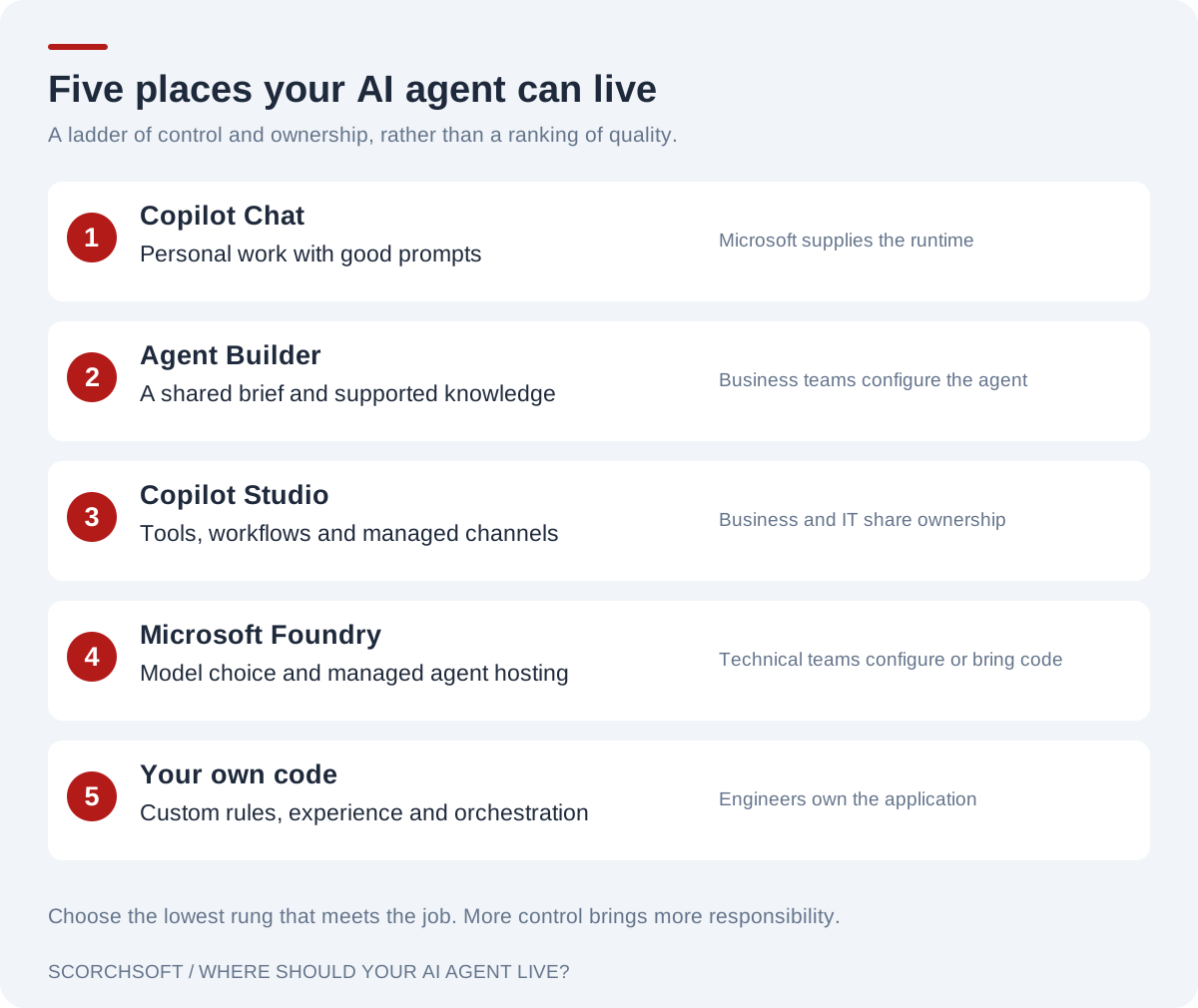
Five options, from a personal Copilot prompt to an application you own. Choose by the requirements of the job.
Part 2: The five places an agent can live
Think of the five places as a ladder of who builds the harness. On the bottom rungs Microsoft builds it and you fill in the brief; at the top you build it yourself. Each step up gives you more control, asks for more skill and changes how you pay. Rungs 4 and 5 overlap: Foundry can run your own code, so the real question at the top is whether your code runs inside Foundry's identity, tracing and evaluations, or whether you provide those yourself.
Below the ladder sit two options people forget.
Before you build: don't, or buy
- Don't use an agent if the steps are fixed and follow strict rules. Microsoft's own guidance says to use "regular code or nongenerative AI" there, because it's "faster, cheaper, and more reliable". The same guidance says a plain FAQ over a fixed set of documents doesn't need an agent either; a simpler retrieval set-up will do.
- Buy one if it already exists. Once an agent is justified, the next question in Microsoft's own decision tree is whether a ready-made agent meets your requirements. Researcher and Analyst (part of Microsoft 365 Copilot), Fabric data agents, the agents inside Dynamics 365, GitHub Copilot and the Employee Self-Service agent all count. Check what your licences already include before you build.
Rung 1: Copilot Chat, with good prompts
What it looks like: Copilot in Teams, Outlook or the browser. People type; it answers. Notebooks let someone gather files and standing instructions in one place.
What it can see depends on the licence. Copilot Chat comes with eligible Microsoft 365 business and enterprise plans (E3 and E5 included). On its own it works from the web, the instructions and what the user gives it. With pay-as-you-go billing switched on by an admin (it's off by default), agents in Copilot Chat can also read SharePoint, Copilot connectors and Dataverse, metered per use. Only the full Microsoft 365 Copilot licence (being renamed Microsoft Copilot since August 2026; price lists still use the old name), US$30 per user per month on an annual commitment (US$21 for the Business edition, for organisations of up to 300 users, with a first-year promotion to US$18 until 31 December 2026), grounds answers in the user's own mail, chats and meetings, and puts Copilot inside Word, Excel and PowerPoint.
Good for: personal productivity. Drafting, summarising, finding. The best prompt in your team.
What it can't do: share a configured behaviour reliably across a team, act in your systems, or run without someone asking.
Pro tips
- Point at the sources. Type
/in the prompt box and pick the exact files (and, with the full licence, people, meetings or emails) Copilot should use, rather than hoping it finds them. - A shared Notebook is the cheapest team agent. Put the team's standing instructions in a Notebook, pin only the files it should answer from, and share it. New files can take a few minutes to become available.
- Schedule the weekly prompt (the Monday briefing, the project summary) instead of building an agent for it. It needs the full Copilot licence, and it quietly creates a Power Platform environment, so tell your MSP.
Rung 2: Agent Builder (a shared brief)
What it looks like: inside Copilot, someone creates an agent with a name, instructions, starter prompts and knowledge: up to 100 SharePoint files, 50 OneDrive files, 20 uploads, four websites and Copilot connectors. It can also use code interpreter, image generation and, since October 2026, skills. Microsoft calls these declarative agents: you declare the brief, Copilot supplies the brain and the harness.
Good for: the HR policy helper, the bid-writing assistant, the "how do we do this here" agent. Fast, owned by the business, permission-trimmed, inside Microsoft's compliance boundary.
What it can't do: Agent Builder "doesn't support authoring actions that integrate external services", so no tools that change other systems, no workflows, no website front door, and it can't be used in Teams group or one-to-one chats. It can't stop the model using its general knowledge. Files uploaded straight into the agent are visible to anyone who can use it, whatever the file's original permissions.
Two notes. That limit is Agent Builder's, not declarative agents' in general: a developer can build a declarative agent with the Microsoft 365 Agents Toolkit (in VS Code) that calls an API or MCP server, still on Copilot's brain and harness. And an Agent Builder agent that outgrows itself can be copied into Copilot Studio, which runs Agent Builder agents behind the scenes, rather than rebuilt.
Cost: for licensed Copilot users, nothing extra. For unlicensed users, agents grounded only in instructions or public websites are free; agents that read tenant data are billed in Copilot Credits.
Who can make them: admins decide who can create agents and who can share them beyond themselves, in the Microsoft 365 admin centre and the Power Platform admin centre. Set that before switching agents on.
Pro tips
- Write instructions like a short spec, with headings, bullets for things in any order and numbered steps only for real sequences. Microsoft calls structure "one of the strongest signals" the model uses. Then test the agent against plain Copilot: if the answers are no better, the agent isn't earning its place.
- Keep the instructions in the agent. Don't get round the 8,000-character limit by moving them into a SharePoint file: Microsoft treats knowledge as untrusted, so its injection filters can strip instructions, and anyone who can edit the file can change the agent.
- "Only use specified sources" prioritises; it doesn't block. If the agent must never answer from general knowledge, that's a Copilot Studio job. And a SharePoint site doesn't include its lists: add each list's own address.
Rung 3: Copilot Studio (low code, real tools)
What it looks like: a web designer for agents. You add knowledge (SharePoint, Dataverse, Azure AI Search, websites), connected agents (including Fabric data agents, in preview), tools (Power Platform connectors, your own APIs, MCP servers), agent flows (fixed sequences of steps) or workflows (automations whose steps can include AI, on the Microsoft Copilot harness), and triggers that start an agent when something happens, with no person asking. It publishes to Teams and Copilot, a website or a contact centre.
Microsoft now uses the word harness for the runtime options inside Copilot Studio, as of November 2026:
- the standard harness (generally available), where you define topics (scripted conversations) and paths, predictable and on a fixed rate card;
- the Microsoft Copilot harness (generally available; called the GitHub Copilot harness until 28 October 2026, and still under that name on many Microsoft pages), which plans its own steps across tools, creates and edits Office files, and bills by usage from the moment you start building;
- the Customer Conversation harness (public preview since 21 October 2026), for customer-facing chat and voice with handover to people;
- and, in Microsoft's licensing and admin pages, a Copilot Chat harness for Copilot Chat agents.
Good for: staff-facing agents that do things (IT helpdesk triage that opens a ticket, a sales-prep agent that reads the CRM), customer chat on a website with handover to a person, and autonomous agents on simple triggers ("a new order arrived"). Its strengths are speed, the connector library, ownership by the people who know the process, and governance a large organisation already understands: environments, data-loss policies, Purview and Agent 365.
It's more testable than its reputation. Agent Evaluation has been generally available since March 2026, with APIs since April. Agents move between development, test and production as solutions, through Power Platform Pipelines, Azure DevOps or GitHub Actions, with native Git integration.
Where it strains: complex or fast-changing business logic, many interlocking rules, and high volume. (A single hard rule can live in a deterministic flow step; a rulebook is better in code.) Some settings (channels, web-chat security, sharing, Application Insights) still need manual steps after each deployment, and on the Microsoft Copilot harness the evaluation runs themselves cost credits. Practitioners repeatedly report latency, limited visibility into why an agent did what it did, and behaviour that differs between Teams, Copilot and the web (anecdotes, but recurring ones). Microsoft's own documentation notes the agent can occasionally withhold a correct answer when a citation goes missing. Production-quality retrieval sometimes means bringing your own index: in Microsoft's own Dunaway case study, the team replaced Dataverse knowledge with an Azure AI Search index they controlled, called from Copilot Studio. They stayed on the platform and improved the part that mattered.
Cost: Copilot Credits: US$0.01 each pay-as-you-go, or US$200 a month for 25,000 (unused credits don't roll over). A scripted answer is 1 credit, a generative answer 2, and grounding it in tenant data adds 10. Licensed Copilot users using an employee-facing agent as themselves aren't charged on the standard harness, within fair use; autonomous runs and computer use are billed regardless, and the Microsoft Copilot harness bills by usage. Two traps:
- Reasoning models (models that think in steps before answering, using many more tokens) bill by tokens. In Microsoft's own illustrative example, a public website agent on Claude Opus 4.7 spends 141 credits on one follow-up question and 461 if the question starts a new conversation: about US$1.41–4.61, before feature charges.
- The cap: at 125% of prepaid capacity, agents stop responding, mid-conversation, unless pay-as-you-go is linked.
Pro tips
- Descriptions do the routing now. With generative orchestration, each topic's, tool's and knowledge source's description is "the most important factor" in what gets used. Give each a distinct one- or two-sentence description, including what it doesn't do; two similar descriptions make the agent's choice unpredictable.
- Know what "Allow ungrounded responses: off" costs. It also blocks sensible follow-ups answered from the previous turn and the agent's own clarifying questions, and withholds correct answers that lack a citation. If you switch it off, tell the agent to cite every statement and retest your follow-up questions.
- Pick a reasoning model only where it's needed, and keep its instructions and knowledge tight. Every turn bills its tokens, which is why Microsoft's example costs more than three times as much at the start of a conversation.
Rung 4: Microsoft Foundry (Azure's agent platform)
What it looks like: Foundry holds Azure's model catalogue and its Agent Service. You can define a prompt agent in the portal with no code (instructions, model, tools), or deploy a hosted agent: your own code, in a container, running in Foundry's managed runtime with its own Entra identity, scaling, tracing and evaluations (generally available since mid-2026). Foundry agents can be published into Teams and Copilot. Hosted agents can run Anthropic's Claude Agent SDK as well as OpenAI's Agents SDK, LangGraph and Microsoft's Agent Framework. Changes go live like software: agents are versioned and immutable, deployed from a pipeline, and a bad version can be rolled back.
Good for: teams that want Azure's identity, private networking, billing and monitoring without running servers; model choice under one bill, with a model router that can pick the cheapest adequate model; versioned agents with built-in evaluations that can run as a gate in a CI pipeline, plus automated red teaming; and sensitive workloads that need network isolation. Because the current Agent Service is built on OpenAI's Responses API and hosted agents run ordinary OpenAI Agents SDK, LangGraph or Agent Framework code, Foundry work moves more easily than a Copilot Studio topic does.
Where it strains: churn and unfinished parts. The first Agent Service generation is now "classic" and retires on 31 March 2027; Foundry Workflows retire on 1 December 2026, with Microsoft pointing people to its Agent Framework instead. Microsoft's own status page still lists monitoring, memory, agent guardrails and the AI gateway as preview, and some features (traces among them) don't yet fully support network isolation. Tool support varies by model and region. The portal needs no code, but it's built for technical teams, not business users.
Cost: pay per token, plus compute for hosted-agent sessions. OpenAI's current family on Azure is GPT-6: for example GPT-6.1 sol at US$2 per million input tokens and US$10 per million output tokens, GPT-6.1 terra at US$1 and US$5, the top model GPT-6 astra at US$10 and US$50, and the smallest, GPT-6 luna, at US$0.10 and US$0.50 (Global Standard, short context). Claude Opus 5.5 is US$4 and US$20 (list prices, November 2026). Repeated input that's cached costs a tenth to a twentieth of the normal price for GPT models (a tenth for most Claude models, a twentieth for Claude Opus and Sonnet 5.5); writing to the cache costs a little more than normal input (1.25 times for Claude and for GPT-5.6 onwards, including the GPT-6 family). Flex processing, for work that isn't urgent, costs half on the GPT-6 family. Steady workloads can reserve capacity (provisioned throughput, from US$260 a month per Global unit on a monthly reservation, with a minimum number of units per model). Keeping processing inside a data zone (a group of regions, such as the EU) adds 10%.
Pro tips
- Start on Global Standard (new models first, the most quota, the lowest price) and move to a data zone or regional deployment for a named reason. When residency matters, use Azure Policy to block the deployment types you don't allow. A UK organisation wanting European processing needs an EU data zone in an EU region.
- Give the model router a short approved list, never the open pool. Its context window is the smallest of its models, and its list doubles as the failover set.
- Size hosted agents for one session. Each session gets its own sandbox and you pay for all active sessions, so oversizing multiplies cost by concurrency. Grant permissions to the agent's own identity, not the project's.
Models and terms: the small print, by surface
This is the question everyone asks: which models can I use where, and under whose contract?
OpenAI's GPT models are the default almost everywhere. In Foundry they're sold by Microsoft under Microsoft's terms and can run in a US or EU data zone, or in a single chosen region (pay-per-token or reserved, depending on the model), so a UK or EU organisation can keep GPT processing in Europe; UK-only processing depends on which models the UK regions offer. New OpenAI models and API features often reach OpenAI's own API before Azure. In Copilot Studio, the default is a floating "GPT Chat Latest" that updates within a version silently and gives 30 days' notice of a move to a new major version (in the UK it's processed in-region); models you pin can retire quickly (three GPT models retired in October 2026 and five more retire on 12 November).
Anthropic's Claude models are available on both surfaces, under different terms:
| Comparison | Copilot, Copilot Studio | Microsoft Foundry |
|---|---|---|
| Whose contract | Anthropic is a Microsoft subprocessor: Microsoft's product terms and data protection addendum apply | Anthropic is the data processor, under Anthropic's terms and SLA, even when the model is hosted on Azure |
| Where data is processed | Outside the EU Data Boundary (Microsoft's commitment to keep EU customers' data in the EU); marked "cross-geo" outside the US | Hosted-on-Azure version keeps prompts and outputs in Azure, except usage metadata and content Anthropic's safety systems flag; the Anthropic-hosted version may process data outside Azure. The only data-zone option is the US, so UK and EU customers get Global deployment |
| Default | Off by default in the UK, EU and EFTA; an admin switches it on in the Microsoft 365 admin centre, and for Copilot Studio also per environment | Deployed through an Azure Marketplace subscription and billed in Claude Consumption Units, on your Azure invoice |
| Models (Nov 2026) | Older generation: Sonnet 4.6, Opus 4.6–4.8 | Current generation: Opus and Sonnet 5.5, Haiku 5.5 and others |
| Agents | Selectable as the agent's model | Not in Agent Service's model tables for portal-built prompt agents (6 November 2026), though the model router page says it can route prompt-agent calls to Claude: test before relying on it. Documented routes: code, or a hosted agent (including the Claude Agent SDK) |
| Catches | Some newer "Anthropic models with Data Retention" revert to Anthropic's own terms, with data kept up to 30 days, and need a separate opt-in | Not available on CSP subscriptions; small default quotas on pay-as-you-go subscriptions (40 requests a minute for Opus 5.5); no batch processing or reserved capacity; file handling, code execution and Agent Skills need the Anthropic-hosted version; Foundry applies no content filter of its own (Anthropic's safety systems still apply) |
A legal sign-off for Claude in one surface doesn't cover the other. If your Azure is bought through an MSP on a CSP subscription, Claude in Foundry isn't available to you at all.
Calling a provider directly. Code can also call OpenAI's or Anthropic's own API. That usually gets new models and features first (Claude's batch discount, for example) but moves the data processing onto the provider's terms and a separate bill, outside what Defender for AI and Purview's Foundry integration see. It's a legitimate choice, made deliberately, with its own sign-off. To bring it back under governance, route the calls through API Management (which can apply token limits and logging to Anthropic's and OpenAI's APIs) and register the agent in Agent 365 like any other.
Rung 5: Your own application on Azure
What it looks like: your developers write the agent in Python or TypeScript and host it on Azure Container Apps, App Service or Functions, behind your own React front end or inside Teams. The pieces they'll name:
- The agent's logic: a framework such as the OpenAI Agents SDK, Anthropic's Claude Agent SDK, LangGraph or Microsoft's Agent Framework (the successor to Semantic Kernel and AutoGen, generally available since April 2026, and model-neutral).
- The models: usually called through Foundry, so they sit on your Azure bill under your Entra identities, with no keys in the code.
- The front door: your own web app, or the Microsoft 365 Agents SDK, which is how code shows up in Teams and Copilot.
Good for:
- Hard rules. "Never offer more than 10% off" is a line of code that runs every time, not an instruction the model usually follows.
- Approvals, retries and doing things exactly once, built as ordinary software.
- High volume, once it's high enough to repay the build (see question 4).
- Product-grade experiences for customers, with your design and your behaviour.
- Software discipline as the default: pull requests, evaluation gates in CI, pinned model versions, controlled releases.
- Model freedom: route each step to the best or cheapest model, and change provider by swapping an adapter rather than the agent, provided the framework supports both and your tests prove the switch.
Where it costs: you own everything Microsoft would otherwise run: security, hosting, monitoring, upgrades, on-call, and SDKs that change monthly. It needs skilled people, the first version takes longer, and you step outside the Power Platform governance your IT team and MSP already know, so you bring your own. Microsoft's documentation lists what open-source frameworks leave to you: "containerization, web server setup, security, memory persistence, scaling, instrumentation, and version rollbacks". A Foundry hosted agent takes some of that back.
What you rebuild. On the lower rungs, Microsoft supplies sign-in, permission trimming, data-loss policies, audit logs and an agent register. In code you wire those up yourself: Entra sign-in and on-behalf-of for every data call, your own audit log and monitoring, content safety checks, and registration in Agent 365.
Cost: tokens, plus hosting, plus engineering. The tokens are usually the smallest of the three.
Pro tips (for developers)
- No keys anywhere. Point the standard OpenAI client at Azure's v1 endpoint with an Entra token (Anthropic's Foundry client takes an Entra token the same way), and in production use the managed identity directly rather than the default credential chain, which is slow to fail and can silently pick up a different identity.
- Design every prompt for the cache. Stable content first (tools, instructions, reference text), changing content last, no timestamps in the prefix. Cache writes cost 1.25 times normal input on Claude and on GPT-5.6 onwards (including the GPT-6 family), so a prefix that changes on every request costs about a quarter more, and saves nothing.
- Strict outputs aren't rules. Azure's structured outputs can't enforce lengths, patterns or ranges, so "never more than 10% off" still needs a check in code.
More developer tips (reasoning effort, tracing, durable approvals) are in the appendix.
Part 3: Six questions that decide where an agent goes
Ask these about one agent doing one job.
1. Who meets it, and where?
- Your staff, inside Microsoft 365: start at rungs 1–3. They're signed in, permissions come free, and the front door exists.
- Customers or partners, on your website or app: Agent Builder can't do this. Copilot Studio can publish to a website, and its Customer Conversation harness (preview) is Microsoft's managed answer for customer service. A product-grade experience, with your own design and behaviour, usually means code.
- Nobody: it runs in the background: a Copilot Studio trigger and workflow for simple cases; a Foundry hosted agent or code when it's business-critical.
2. What must never go wrong?
Put judgement in the model and rules in something deterministic. If a mistake costs money, breaks a policy, reaches a customer or changes a record, the check belongs in a workflow step at least, and in code when the rule is complex or the stakes are high. Microsoft draws the same line between declarative agents and custom engine agents (agents that bring their own orchestration and models), using "a financial loan approval agent" with "specific business rules" as its example of the second.
3. Where does the data live, and what shape is it?
- Documents in SharePoint: rungs 1–3 handle these natively, with permissions intact.
- Records in Dataverse or Dynamics: Copilot Studio is at home here; Dataverse is also an MCP server any agent can use.
- Numbers in Fabric: build the semantic model first, then a Fabric data agent, which you can surface in Copilot, in Copilot Studio (preview), or in Foundry through the new Fabric IQ tool (preview; the old data-agent tool was deprecated on 6 November 2026). Without agreed definitions, no agent gives reliable figures.
- Spread across systems, or messy: an index you control (Azure AI Search) or code.
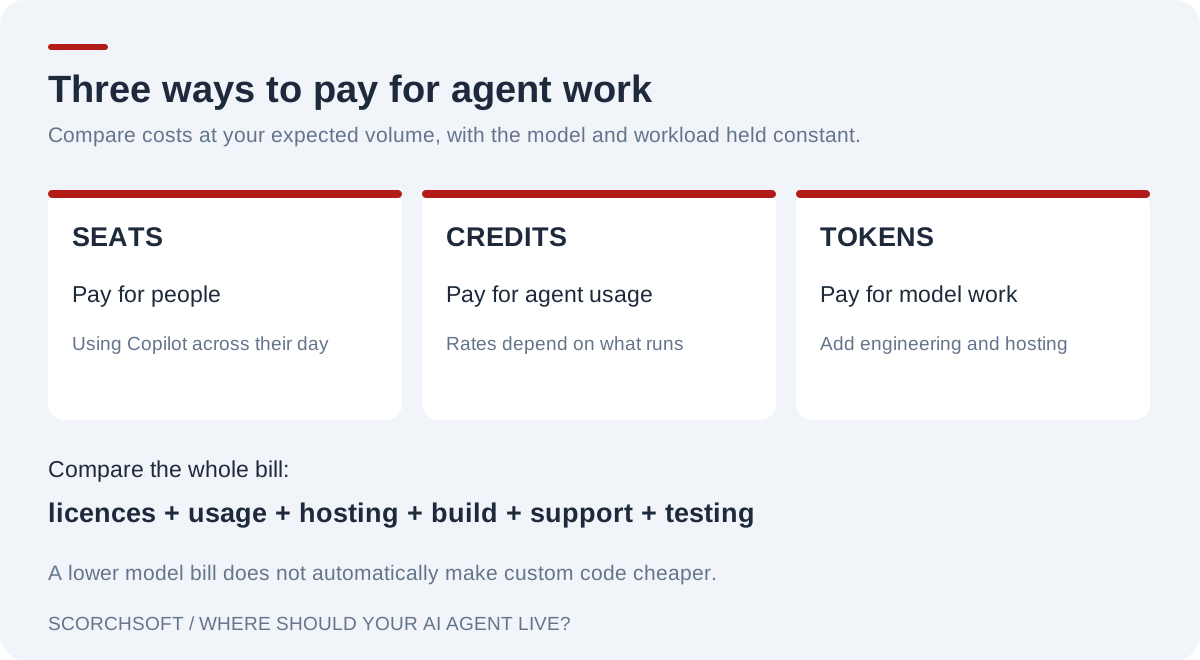
Seats pay for people, credits for agent usage and tokens for model work. Compare the total cost, including engineering and support.
4. How much will it run, and who pays?
Microsoft's three pricing units suit three situations:
- Seats pay for people using Copilot across their whole day.
- Credits pay for conversations with agents: cheap for light internal use, steep with reasoning models, autonomous runs or high volume.
- Tokens pay for model work directly. Credits include the model; tokens don't include the engineering. On an everyday model, tokens are several times cheaper than credits for the same answers; on a frontier model they can cost more. Either way you also pay for building, hosting and testing, which the token bill doesn't show.
Two worked examples: our arithmetic at US list prices. Everyday-model tokens are priced on Azure's GPT-6.1 terra (US$1 in, US$5 out per million) with no caching, which is cautious; frontier-model tokens on GPT-6 astra (US$10 in, US$50 out), with three-quarters of each prompt cached.
An HR policy agent for 1,000 staff, four questions a month each. Licensing everyone for Microsoft 365 Copilot costs US$30,000 a month, which only makes sense for wider reasons, but if they already hold the licence the agent costs nothing extra. Without licences, Copilot Chat plus an agent grounded in SharePoint costs about 48,000 credits, roughly US$480 a month. The same answers through the API cost about US$34 a month in everyday-model tokens (6,000 input and 500 output tokens per answer), before a search index, hosting and the engineering to build it. The configured agent wins easily.
A public support agent. Microsoft's own example: 900 conversations a day, each with four scripted and two generative answers, about 27,000 a month. For the token columns we assume two to six model calls a conversation, about 4,000 tokens in and 400 out each.
| Comparison | Copilot Studio (credits) | Foundry prompt agent | Code on Azure |
|---|---|---|---|
| Build | days of a maker's time | a few weeks: set-up plus a website chat front end (~US$10,000–20,000) | several weeks of engineering (~US$30,000–60,000) |
| Running costs a month, before model use | included in the credits (admin time aside) | search index and monitoring, plus about a day's upkeep (~US$1,000–1,500) | hosting, index and monitoring (~US$500–1,000), plus 2–4 developer days' upkeep (~US$1,500–3,000) |
| Model use, 27,000 conversations | US$1,800–2,160 (model included) | everyday model US$320–970; frontier US$1,800–5,300 | same as Foundry |
| Model use, 200,000 conversations | US$12,800–16,000 | everyday model US$2,400–7,200; frontier US$13,200–39,600 | same as Foundry |
| Change a wording | the business, same day | a tested release | a tested release |
| Governance | inside Power Platform and Purview | Foundry's identity, tracing and evaluations | your own logging and monitoring, or a support contract |
Build, running and upkeep figures are Scorchsoft's estimates, not Microsoft's; yours will differ. Microsoft's example assumes mostly scripted answers; an agent giving only generative answers would use half as many credits again. Agent 365, if you use it, costs the same whichever column you choose (US$15 per user per month for the people who manage, sponsor or use agents, which for 1,500 users would be up to US$22,500 a month; or included in Microsoft 365 E7, Microsoft's top bundle of E5, Copilot and Agent 365, at US$99 per user per month).
What the table says:
- At 27,000 conversations a month, Copilot Studio and a Foundry prompt agent cost about the same to run, and code costs more. The configured agent is the sensible choice unless you need code for another reason.
- At 200,000 a month on an everyday model, both token routes save real money: code roughly US$2,000–12,000 a month (about US$6,500 at the middle figures), repaying its build in roughly five to nine months, longer at the dear end. A Foundry prompt agent saves similar sums with a smaller build, if it can do the job.
- On a frontier model, tokens alone can match or exceed the credits, so code is chosen for control, not price.
Volume and model choice, not cleverness, move the line.
5. Which model do you need, and on what terms?
If the default model is fine, every rung works. If you need a particular model, or data processed in the UK or EU, check the small print above before choosing: menus differ by product, models retire on short notice, and the same Claude model arrives under different contracts in Copilot Studio and Foundry. Code, and Foundry's catalogue, give the most freedom.
6. Who will own it, and how will a change be tested?
- A business team that wants to adjust the wording and knowledge itself: rungs 2–3, inside guardrails IT sets.
- A development team that will test, version and release it: rungs 4–5.
- Your MSP, in many Microsoft estates, which already runs the parts every agent depends on (see Part 5).
How a change goes live differs by rung, and it's worth agreeing before launch:
- Agent Builder: the owner edits and republishes; there's no test stage, so keep these agents low-stakes.
- Copilot Studio: build in a development environment, test with Agent Evaluation, and move the agent to production as a solution through Power Platform Pipelines (or Azure DevOps or GitHub), with a checklist for the settings solutions don't carry.
- Foundry and code: the agent is defined in the repository, evaluations run in the pipeline, each version is deployed by the pipeline, and a bad version is rolled back.
An agent nobody owns is a risk in its own right. Microsoft's own list of the top ten Copilot Studio security risks includes agents with no valid owner, and agents that run with their maker's permissions for everyone.
The rule of thumb
Pick the lowest rung that meets the job on all six questions, and move up only when one of them forces you to. That matches Microsoft's own advice, which recommends a time-boxed bake-off of one to two weeks per option: "If a low-code solution meets functional and security requirements, proceed with that option."
The named reasons to move up are: a rule that must always hold; a customer-facing product; volume that makes credits expensive; a model or contract you can't get lower down; or a team that needs to test every change like software. Each one sets a floor, not a destination:
| Reason | The lowest rung it needs |
|---|---|
| A rule that must always hold | Copilot Studio, with the check as a flow step; code when the rules are complex or the stakes high |
| Customers rather than staff | Copilot Studio; code for a product-grade experience |
| Volume that makes credits expensive | Foundry, paying per token |
| A model or contract you can't get lower down | Foundry |
| Testing every change like software | Foundry, as a hosted agent running your own code |
What climbing feels like
The reasons above are easier to recognise as frustrations than as a list. These are the moments, at Pritchard (all invented), when someone decides to move up a rung, and the case where staying put is the better answer.
| Boundary | The frustration | Climb when | Stay if |
|---|---|---|---|
| 1 → 2 | Shona, a housing supervisor: her twelve officers each keep their own copy of the lone-working prompt, and one copy has lost the line about ringing the duty manager after nine at night. Same question, twelve answers. | A team needs the same instructions and the same files, every time. | It's one person's habit, or a shared prompt or shared Notebook covers it. |
| 2 → 3 | Gareth, IT helpdesk lead: his Agent Builder agent sorts out "my laptop won't connect", then sends people to the portal to type it all again. Tickets still arrive without the site or asset number. | The agent must do something in another system, ask its questions in a set order, or start without being asked. | Most questions end in an answer, and a link is enough for the rest. |
| 3 → code | Pauline, finance director: auditors asked why one invoice was approved. The transcript showed what the agent did, but the price tolerance was a sentence in its instructions, so nobody could prove it was applied. At 6,000 invoices a month the credits were hard to forecast. | A rule that must always hold, a record an auditor can follow, and tests on every edge case: code, which Foundry can run as a hosted agent. | Only one step is hard: keep the conversation in Copilot Studio and put that step behind a tool (a hybrid). |
| 4 → 5 | Imran, digital manager: the tenants' repair booking as a Foundry prompt agent gave fine answers. The hard part was everything else: Pritchard's own pages, live slots from the repairs system, and a booking made exactly once when a tenant taps "confirm" three times. | The agent is one part of a service you build and run. | The agent is most of the job, and a tool your developers write makes the booking. |
| 5 → 2 (coming down) | Dean, a developer, built the lone-working helper in code because code is what he knows. Six months on it has its own security review, its own hosting bill and someone on call; every policy change waits for him; and staff still ask Copilot first. | The people are staff, the job is answers, and the rules are simple. | Climbing has a cost, so make each step earn it. |
Two more boundaries are worth watching. Between rungs 2 and 3, licensing can decide it: staff without a Copilot licence are charged per use for an agent that reads SharePoint. Between rungs 3 and 4, it is often ownership: an agent a manager built in Copilot Studio becomes something IT has to run, with environments and data-loss policies.
Part 4: The hybrids real systems use
Most organisations end up on several rungs at once, and the best designs join them on purpose.
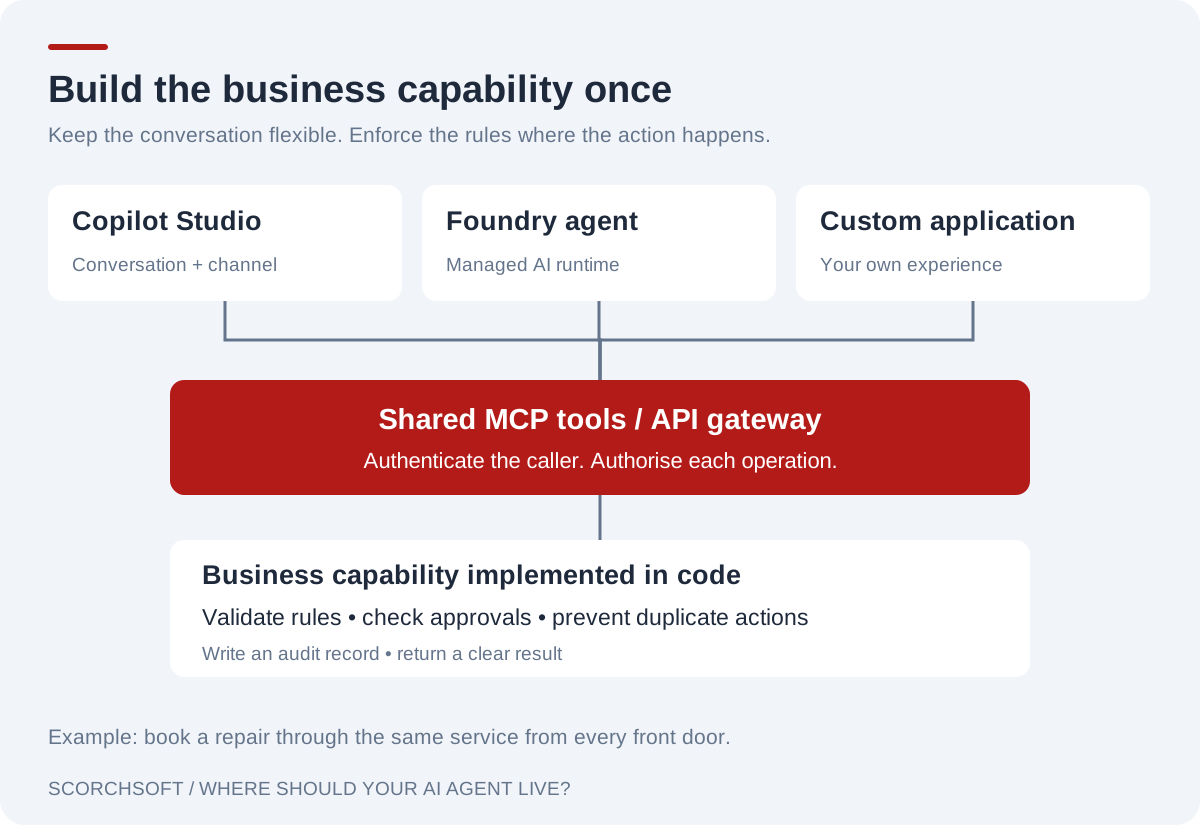
Several agent front doors can call one secured business capability. The service enforces its rules and records each action.
Build the plug once (MCP)
Put a business capability, such as "look up a job", "book a repair" or "check a supplier", behind one MCP server on Azure, secured with Entra and fronted by API Management (Azure's gateway for APIs, which can now publish an API as an MCP server). Copilot Studio, declarative agents built in the Agents Toolkit, Foundry agents, your own code and outside tools such as Claude can all use it. It's the safest first piece of engineering: useful whichever agent platform wins, and it survives a change of mind. It's also where code can live without taking over: the code behind the plug acts as the harness for that ability, checking its rules and keeping its log whichever agent asks (see "Where code earns its place").
Three cautions. Tool descriptions and results from outside servers are untrusted input (Microsoft's own warning). A server meant for every front door has to be reachable over the internet, securely: Claude's connectors, for example, must reach it from Anthropic's published IP ranges, so a server inside a private network needs a firewall rule or a gateway such as API Management. And in Copilot Studio, a Power Platform data-loss policy can block the server for that front door alone.
Pro tips
- Design tools around tasks, not endpoints:
book_repairandsearch_jobs, not one tool per API call. Return readable names rather than internal IDs, keep results short, and send errors back as messages the model can act on ("the date must be in the future"). - Keep the visible tool list short. OpenAI suggests fewer than 20; Anthropic finds selection degrades past 30 to 50. In Copilot Studio, switch off "Allow all" on an MCP server and enable only the tools you need, so a server update can't quietly widen what the agent can do.
- Make read-only a matter of credentials, not labels. Put write tools behind separate permissions, and show each caller only the tools their token allows. The specification says clients must treat a tool's labels, "read-only" included, as untrusted unless they come from trusted servers.
Microsoft front door, code behind it
Copilot Studio handles the conversation, the Teams channel and the governance; it hands the hard part to an agent you wrote over A2A, or calls your API or MCP server as a tool. The business owns the words; engineers own the logic. Design for what crosses the seam: A2A sends the full chat history; the link can use no authentication, an API key or OAuth, so use Entra OAuth with on-behalf-of when the agent acts as the user; and two orchestrators means two places to debug and a little more latency. (Connecting Copilot Studio directly to a Foundry agent is still preview.)
Foundry for models and identity, code for the work
Your Python agent calls GPT and Claude through Foundry: one Azure bill, Entra sign-in with no keys in code, quotas and tracing. Orchestration stays in your framework, in a container you can move; a Foundry hosted agent formalises this and can bridge the agent into Teams and Copilot. Two details catch teams out: GPT and Claude arrive through different APIs (OpenAI's Responses API and Anthropic's Messages API), so the code needs an adapter for each; and the OpenAI Agents SDK uploads traces to OpenAI whenever an OpenAI API key is present, so replace its exporter with one pointed at Azure's Application Insights.
A code agent that shows up in Teams
Built with the Microsoft 365 Agents SDK, or published from a Foundry hosted agent, your own agent appears in Teams and Copilot like any other, running your logic and your model.
Start low, and usually stay there
For most staff-facing agents, the first Copilot Studio version is the one that goes live, and that's a good outcome. When a named reason to move up appears, the next step is usually a hybrid: keep the conversation, the channel and the ownership in Copilot Studio, and move the hard part behind an API, MCP server or Foundry agent. A full move into code comes last. When you do take it, expect to rebuild the conversation; what carries over is your test questions, your tools behind MCP or an API, and your data and index work.
Part 5: Who runs what
In most organisations of this kind, the MSP already runs the parts every agent depends on: licence assignment, Power Platform environments and data-loss policies, Purview, the Azure subscription pay-as-you-go agents bill to, and the agent register. The business builds and owns rung 2 and 3 agents inside those guardrails. Developers, in house or a partner, build rungs 4 and 5 and hand over a runbook: what it does, how it's monitored, who to call when it misbehaves, and how a change is tested and released.
Questions to settle with your MSP before the first agent:
- Which environments can makers build in, with which connectors?
- Who can share an agent with the whole organisation?
- Which Azure subscription do pay-as-you-go agents bill to, who sees the budget alerts, and is it a CSP subscription (which rules out Claude in Foundry)?
- Who switches on partner models such as Claude, which are off by default in the UK?
- Who reviews the agent register for agents with no owner, and how often?
- Will you support an agent built in code, or only its Azure hosting?
- Who holds the Azure roles on the Foundry project, and who approves a new agent identity or app registration?
- What does our contract cover for agents (support hours, response times, who fixes a broken connector)?
- Are makers kept out of the Default environment (the one every user can build in), with a proper development, test and production set-up instead?
Part 6: One organisation, five agents
An illustrative example. Pritchard Group (invented) maintains 40,000 rented homes for housing associations across the north of England. It has 1,200 staff, Microsoft 365 E3 with some Copilot licences, Azure through its MSP, and Fabric for reporting. Hayley, its head of operations (also invented), has five ideas.
| The job | Where it goes | Why | Owner |
|---|---|---|---|
| Answer any member of staff's question on the lone-working policy | Agent Builder | Documents in SharePoint, staff inside Microsoft 365, no actions | HR |
| IT helpdesk triage that asks the right questions and opens a ticket | Copilot Studio | Staff-facing, needs one tool (the ticket system's connector), modest volume | IT service desk, with the MSP |
| "How many repairs are overdue in Leeds this month?" | Fabric data agent, surfaced in Copilot | The numbers live in Fabric; the semantic model defines "overdue" once. Buy before you build | Data team |
| Check 6,000 supplier invoices a month against purchase orders, with approval above £5,000 | Code, run as a Foundry hosted agent | Hard rules and approvals in code; Foundry supplies its identity, tracing and evaluations; approvals land in Teams | Finance, with the developers |
| Tenants reporting and booking repairs on the website | Code (React and Python) with an MCP server for the booking system | Customer-facing, high volume, must never double-book. The same MCP server lets the helpdesk agent look up a tenant's repair | Digital team, with the developers |
Five agents, four places, one plug. The quickest wins are at the bottom of the ladder; the code sits where the rules and the volume are.
Part 7: Things to get right wherever the agent lives
- Start with the simplest thing that works. A good prompt, then a single agent with a few tools, then a fixed workflow with one model step. Add more agents only when a measured failure calls for it.
- Use the smallest model that passes your tests, and move up only where the tests show it's needed.
- Design the tools carefully. A few well-named tools with clear descriptions, read-only by default, returning short, structured results.
- Write the test questions first. Collect 30–50 real questions or tasks with agreed answers before you build. Run them on every change of prompt, model or tool, and keep them in a file you own, so they move with the agent between platforms. Copilot Studio and Foundry both run them natively.
- Trace every run, and read real traces regularly. They show what the tests missed.
- Ask a person before anything that can't be undone: payments, record changes, messages to customers.
- Tidy permissions before launch. Agents surface what was always visible. Run Purview's oversharing checks first.
- Treat what agents read as untrusted. In 2025 a flaw called EchoLeak (CVE-2025-32711, fixed by Microsoft) showed that one crafted email could make Microsoft 365 Copilot leak data without anyone clicking anything. An agent that reads outside content, holds private data and can send things out needs all three limited.
- Give every agent an owner, an identity and a place in the register (Entra Agent ID, Agent 365), and decide who may create and share agents.
- Watch the bill. Budgets and alerts on credits and tokens; no reasoning models for simple questions.
- Measure value. Gartner forecasts that over 40% of agentic AI projects will be cancelled by the end of 2027 over cost, unclear value or weak risk controls. It's a forecast, not a measurement, but the remedy is the same: agree what success looks like before you build, and when you'll stop if it hasn't arrived.
Pro tips: governance
- Use Restricted Content Discovery as a stopgap on high-risk sites (finance, HR) while their owners fix permissions. It hides a site from Copilot without changing who can open it. Start with the biggest sites: on sites with more than 500,000 items a change can take more than a week to apply.
- Require sign-in, or sharing limits don't apply. Copilot Studio's sharing limits "only apply to agents that require authentication". Then run Microsoft Defender's ready-made hunting queries for risky agents each month.
- Budgets alert; limits stop. A Microsoft 365 pay-as-you-go budget only sends notifications; spending carries on. Set per-agent limits in the Power Platform admin centre as well.
Where code earns its place
Scorchsoft’s AI agent development and agent harness development work sits in this part of the decision.
The lower rungs are the right default, and this guide has said so. The case for the top of the ladder deserves the same care. Code earns its place when these pains sound familiar:
| The pain | In code |
|---|---|
| Hoping a rule ran | Proof it ran, every time: the rule is code that runs on every request, with a test for every edge case |
| A chat window someone else designed | An experience that's yours: your pages, your journeys, your accessibility choices |
| Logs and retention set by the platform | Your own environment: your logs, your retention, and permissions down to a single field |
| One model, and a cost you can't see per conversation | Choose your model, swap it when a better one arrives, and see what each conversation costs |
| Changes that go straight to live | Every change tested in a pipeline before anyone sees it |
That is what the extra cost of code buys. If none of those pains is yours, the lower rungs will serve you better.
Part code: one business area behind one plug
It is rarely all or nothing. Often the best design is part code. Take one business area, such as Pritchard's repairs scheduling, and build it in code with its own data: the jobs, the rules about which trade goes where and which slots are real, and a record of every booking. Expose it through an MCP server. The agents stay where people already are (a Copilot Studio agent, Teams, the tenants' website), but whenever one of them books a repair, the request goes through that code.
The code behind the plug is the harness for that ability. It checks the rules, guards the data and keeps the log, whichever agent asks, and whichever platform that agent lives on. That is how a business can configure most of its agents and still put the parts that must be right in software it controls.
The answer
Where should your AI agent live? Where its people already are, with its rules where they can't be broken and its abilities where every agent can reach them.
- Configure where you can. For staff inside Microsoft 365, answering questions and taking simple actions, Microsoft's own tools are faster, cheaper at modest volume, and already governed.
- Code where you must. When rules must hold, volume is high, customers are involved, or the model and its terms matter, write it as software, in Foundry or on your own hosting.
- Build the plug once. Put your capabilities behind MCP, and every agent, on every rung, can use them.
This quarter: tidy SharePoint permissions and run the oversharing check; agree with your MSP who may build and share agents; pick two agents from the bottom rungs and one candidate for code, and run a one-to-two-week bake-off on the candidate. Ignite (17–20 November 2026): expect new names and prices, not a new way of deciding. Nothing above needs to wait for it.
Want a hand? If you're working on the upper rungs (Foundry, your own code, or the MCP servers that join them), book a consultation call with Scorchsoft. If your team is finding its feet on the bottom rungs, much of the work is in the habits underneath, and that's what The AI Stairway™ teaches: turning good chats into shared skills, agreeing team rules, connecting AI to your files with controls you choose, and deciding which rules need code. It's tool-neutral, so it applies to Copilot and beyond, and the first module is free at aistairway.scorchsoft.com.
Appendix: more pro tips
Product details in these tips reflect the guide’s research dated 8 November 2026. Check the linked product documentation before implementation.
For makers, admins and architects
- Copying to Copilot Studio is a fork. Copilot connectors, uploaded files, and Teams and email knowledge don't carry over, and later edits to the original don't reach the copy.
- Build in a solution from day one, in a development environment, with environment variables for anything that differs between environments, and keep a written checklist of the settings solutions don't carry.
- Cap spend per agent. Set a monthly limit on each agent in the Power Platform admin centre, including in development environments, because the Microsoft Copilot harness bills while makers are still building. Limits aren't instant, so leave headroom.
- Ask for Claude quota at the start of a project if you're on a pay-as-you-go subscription. Increases are "evaluated individually and aren't guaranteed".
- Behind API Management, don't break streaming: if diagnostic logging is on for all APIs, set the logged response payload to zero bytes, or MCP responses fail.
For governance
- Know the edges of data-loss rules for Copilot. Labelled files can still appear in citations, though Copilot doesn't use their content; files a user uploads into a prompt aren't scanned; and changes take up to four hours. A new rule (preview) keeps external email out of what Copilot draws on, a cheap defence against EchoLeak-style attacks.
- Switch on document-attack detection in Foundry. The shield against instructions hidden in documents and emails is off by default; the one for direct user attacks is on.
For developers
- Set reasoning effort yourself. Low for classifying, routing and routine tool calls; higher only where your tests show a gain. Reasoning tokens bill as output, and on GPT-5.6 onwards (including the GPT-6 family) reasoning from earlier turns is carried forward by default, which raises token use on long conversations with no code change; set it to the current turn unless you've measured a benefit. Claude's equivalent control is the thinking budget.
- Keep traces in your tenant. When an OpenAI API key is present, the OpenAI Agents SDK sends traces, including prompts and tool inputs, to OpenAI. Replace its exporter using
set_trace_processors()with one pointed at Application Insights, and redact before sending. - Build approvals as a wait with a deadline: the workflow waits for a person's decision or a timer, whichever comes first, and uses no compute while it waits. Put side effects (payments, emails, the model call) in steps that run once and record their result.
Sources and product documentation
This guide accompanies the 29-minute Scorchsoft film. The examples at Pritchard Group and its named staff are invented to explain the decisions. Build and upkeep costs are Scorchsoft estimates, rather than vendor quotes.
Product names, availability, quotas, model lists and pricing change. The article’s detailed figures reflect the guide’s research dated 8 November 2026; confirm the current rate card, deployment region and contract for your own tenant before purchasing or implementing.
- Microsoft: Agent Builder and Copilot Studio comparison
- Microsoft: Foundry Agent Service overview
- Microsoft: Copilot Studio plans and UK pricing
- Microsoft: Copilot Studio billing rates and management
- Microsoft: Claude hosting options and subscription requirements
- Anthropic: Claude in Microsoft Foundry
- Microsoft: technology planning for AI agents
Want to talk about your project?
Tell us what you’re trying to achieve and we’ll map the fastest credible path.