
AI software development company
UK AI Software Developers: Bring us the work that slows your team down, or the AI product you want to build. Our Birmingham team develops bespoke AI software, apps and integrations, from the first useful pilot to a supported system.
Building for teams across healthcare, logistics, motorsport and manufacturing
Trusted by 220+ organisations








What do you want AI to do for your business?
Choose the route closest to your situation. You can bring a business problem, an existing system or a product idea.
Find the opportunity
“We know there is wasted effort”
Identify the repeated work worth changing, compare the options and decide which improvement deserves a pilot.
- Map the workflow and the cost of the problem
- Check data, access and practical constraints
Improve an existing system
“We want AI inside the tools we use”
Connect AI to your CRM, databases or existing application, with permissions and approval steps around the actions it can take.
- Extend the systems your team already knows
- Start with one useful, measurable workflow
Build a product
“We have an AI app or platform in mind”
Design and build the product around its users, including the interface, AI features, integrations and support it needs.
- Validate the idea and scope the first release
- Build in stages as you learn from users
Results
Real software, built for real use
Client projects and Scorchsoft's own products: practical evidence of our AI and software engineering experience.
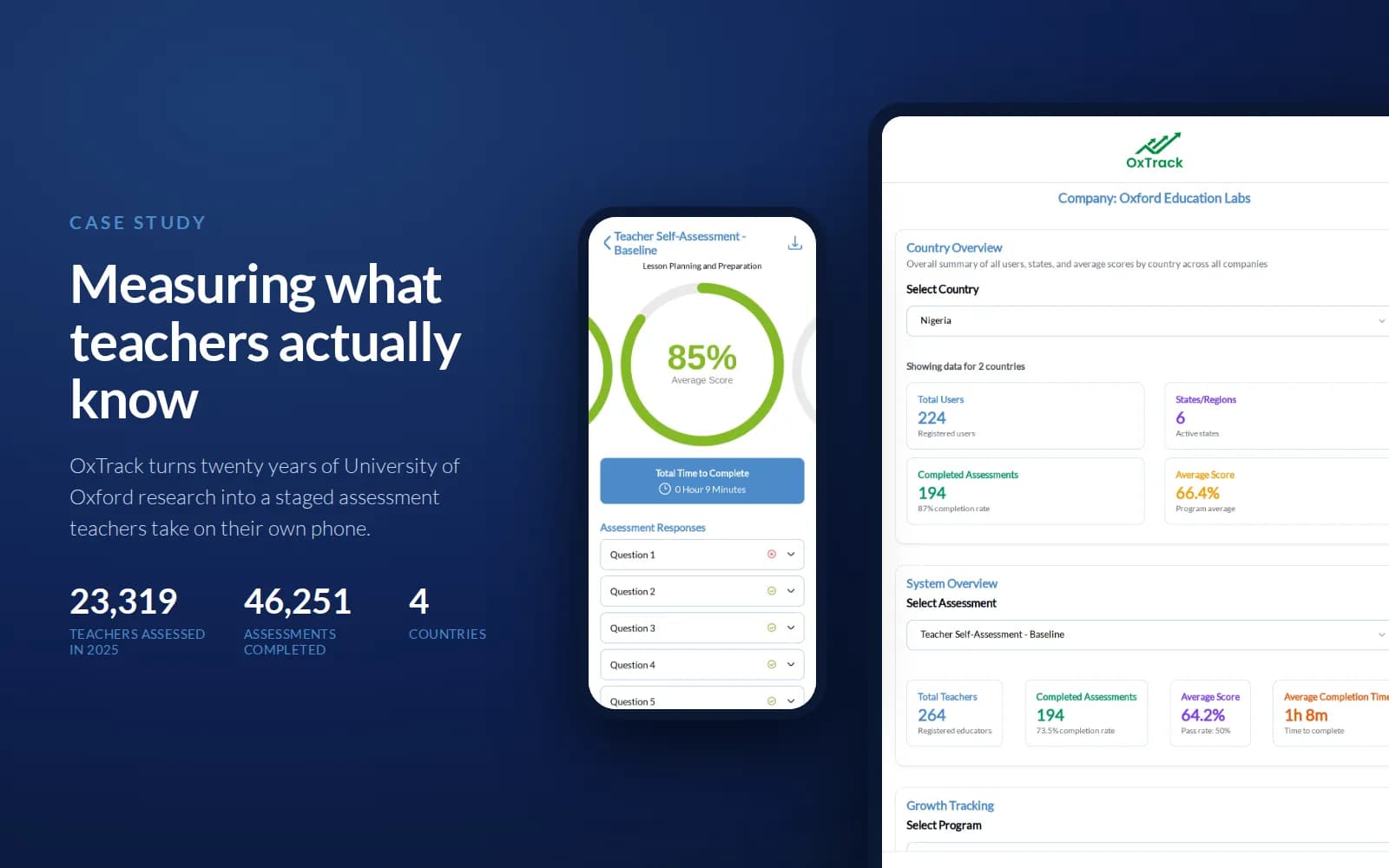
OxTrack: an AI-enhanced teacher assessment platform
Built for Oxford Education Labs, a University of Oxford spinout. The mobile app works offline and syncs assessments to an administration platform. These figures describe the programme's use in 2025.
- teachers assessed in 2025
- 23,319
- assessments completed
- 46,251
- countries
- 4
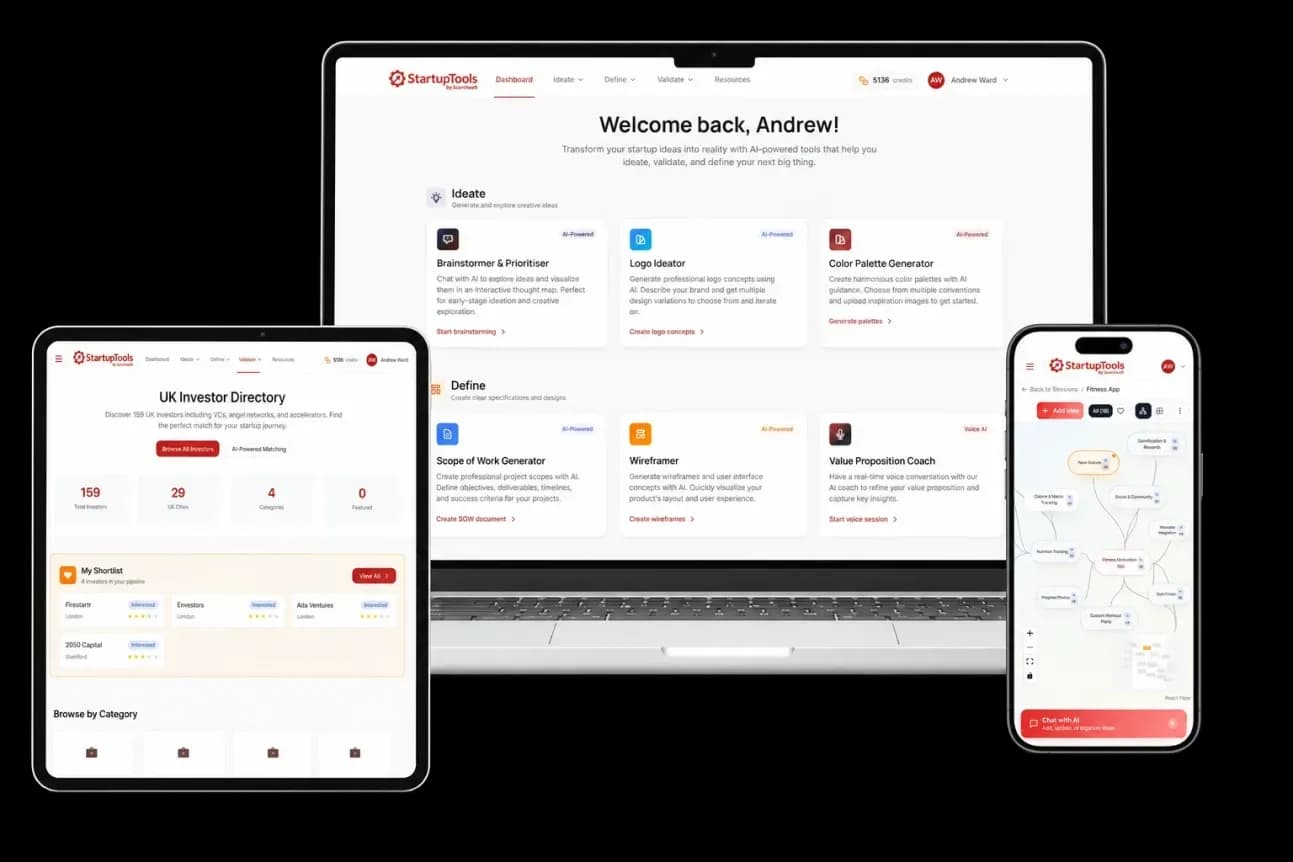
StartupTools
An AI platform that helps founders turn ideas into structured business plans. A working example of AI inside a complete product, with an interface and guided workflow.
Read the case study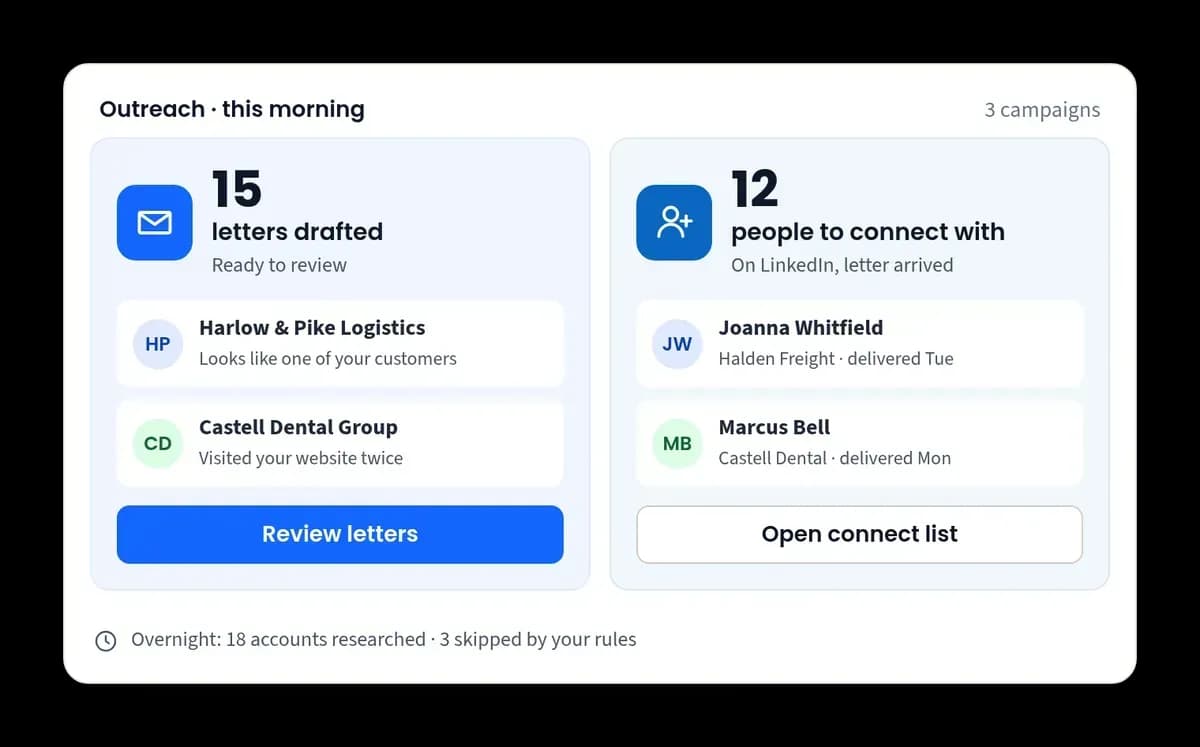
OpsUPLOOP
The operations platform we use at Scorchsoft. AI researches prospects and drafts outreach for human approval, alongside connected sales, billing and delivery records.
Explore the product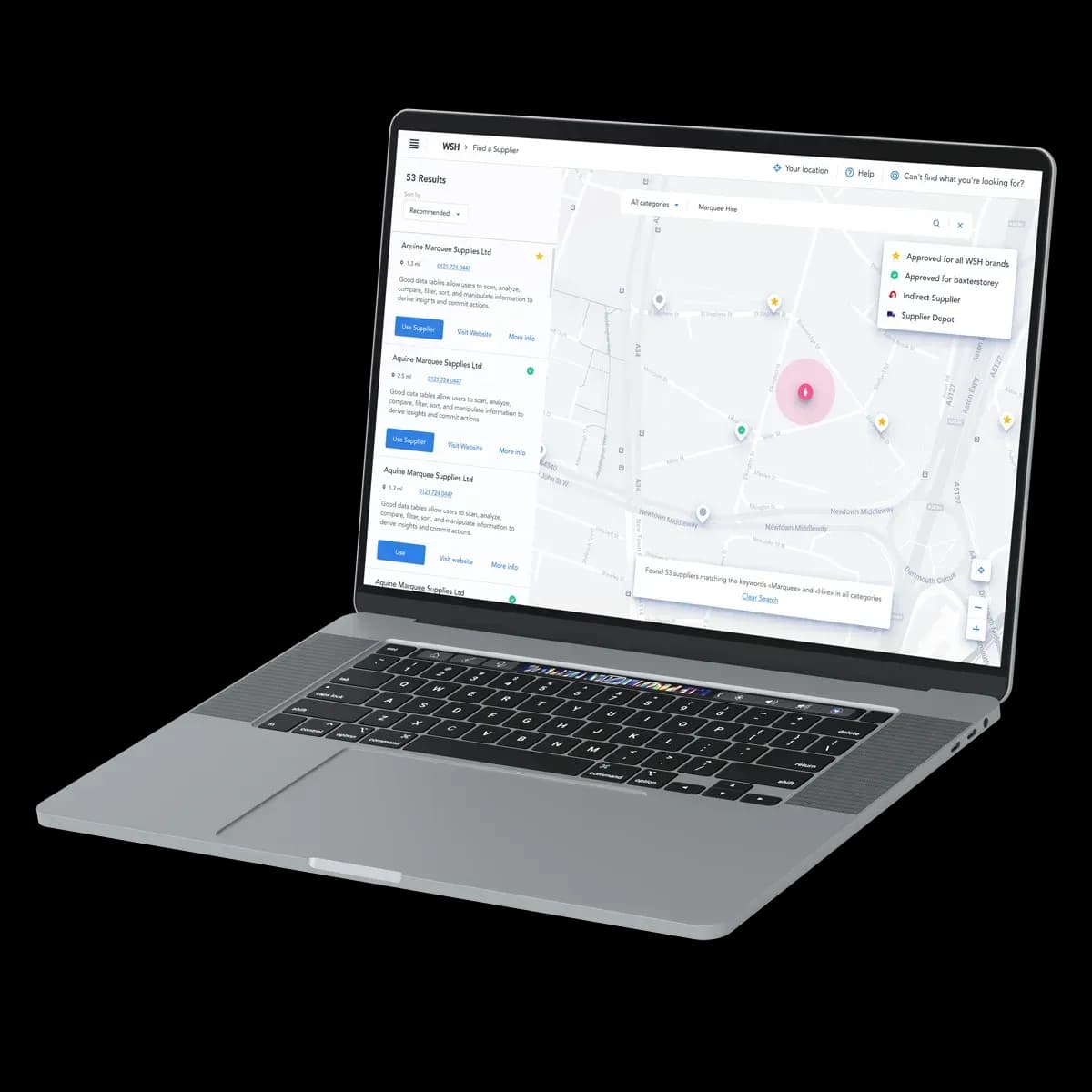
WSH supplier portal
A supply-chain procurement portal with map-based supplier discovery. An example of the connected business software our team builds alongside AI products.
Read the case studyAI automation that fits how your team works
Scorchsoft is a UK AI software development company building bespoke systems for business workflows and digital products. We combine AI with the interfaces, integrations and controls needed to make it useful in everyday work.
A workflow might read an incoming document, extract the fields your team needs, draft a response and prepare an update in your CRM. We agree which steps can run automatically and which need someone to check them.
We start by measuring the current effort, then test the proposed workflow against representative examples. AI agents and automation development explains the delivery service.
- Document extraction, summaries and draft generation
- Workflow routing and structured updates to business systems
- Human review where accuracy or consequences require it

AI across desktop, web and mobile software
Your team should be able to use AI where the work already happens. We can add AI features to existing software or build a new web portal, mobile app or desktop tool around the workflow.
The integration needs to respect your existing permissions and data. We check which interfaces are available, how records move between systems and what happens when a service fails, before choosing the architecture.
Local or offline operation can be appropriate for some tasks, but it depends on the model, hardware and data involved. We assess those trade-offs rather than assuming a cloud service will work everywhere. Explore AI integration services.
- CRMs, databases, internal systems and third-party APIs
- Interfaces designed for staff, customers or field teams
- Deployment choices shaped by access, cost and connectivity

Data classification, knowledge search and useful insights
AI can help organise information that is hard to search or costly to process by hand. We build tools that classify documents, extract structured data and answer questions using approved business information.
For example, a system could group incoming enquiries by topic and prepare them for the right team, or help a colleague find an answer in your policies with a link to the source.
We test performance on your examples and define how uncertain results reach a person. Forecasting or predictive analysis also needs suitable historical data and a clear way to assess whether the prediction is useful.
- Search and question answering over approved information
- Classification, tagging and extraction with validation
- Data preparation through our data engineering service

Beyond ChatGPT: build AI your business can rely on
An 18-minute walkthrough of the move from individual AI chats to connected workflows with checks, approvals and a clear owner.
Read the transcript
Why we keep reaching for code: climbing the AI stairway
Full transcript - 18:09
0:00 - Is that your AI strategy?
[0:00] If you're rolling AI out across an organisation, you've probably been asked this. Everyone has ChatGPT or Claude. Some teams have plugged it into their files, their inbox, their customer database. So, is that it? Is that the AI strategy?
[0:18] It feels like progress, and it is. But you may have noticed the cracks. One person's prompts are brilliant, and nobody else can find them. Two people ask the same question and get different answers. Someone wonders whether that customer list should have gone into a chat. And the pilot that impressed everyone in a meeting has quietly stopped. Nobody switched it off. It just stopped being anyone's job.
[0:45] This film answers that question: where chat tools fit, the point where you need a workflow, why we build those workflows in code, when that's worth it, and what it costs.
[0:59] To keep our bearings, we'll use a map: Scorchsoft's Stairway to Success: seven steps of AI adoption, from zero to six. It runs from no formal adoption, through approved tools and shared good practice, to reusable agents, AI set up to do one job, then workflows built into daily work, and finally AI at the heart of the business. Chat and connectors take you up the first few steps. The jump from three to four is where most firms want help. That jump is what this film is about.
[1:35] We'll follow one everyday job up the stairs: replying to customers who ask for a discount. And we'll start with what can go wrong. Picture a prompt, the instruction you type in, that says: never more than ten per cent off. And an AI that offers a customer twenty-five per cent anyway. Somewhere between that prompt and the customer, that discount has to be stopped. By the end, you'll see exactly where, and why the prompt alone can't do it.
2:06 - Steps 1 to 3: chat, connectors, skills
[2:06] Let's start at the bottom of the stairs. Step one is approved access: everyone gets a proper AI assistant, on a business account rather than a personal one. Step two is using it for real work. Meet Nicola, who runs customer service. She asks the assistant to draft replies to tricky enquiries, and it saves her an hour a day.
[2:30] Then she switches on connectors. In ChatGPT or Claude, a connector links the assistant to another app, like your customer database or shared drive, so it can look things up there, and even make changes, with settings for what needs approval first. Many connectors use a standard called MCP, a bit like a universal plug. Now the assistant checks the customer's history before it drafts. That's a real step up.
[2:58] Step three is shared practice. Nicola's best instructions live in her own chats, so she writes them down once: our tone, our discount policy, three good example replies, and when to hand over to a manager. Saved and shared, that's what ChatGPT and Claude both call a skill: a reusable set of instructions the assistant follows. If you've made a custom GPT, it's a similar idea. In some tools, you can build one just by describing how you do the job. Now the whole team gets Nicola's know-how, not just Nicola.
[3:37] This is genuinely valuable, and it's where we'd tell anyone to start. Skills are a cheap way to find out what works. But look at what's holding it together. In each chat, a person picked the right customer, spotted the missing order, decided the draft was good enough, and pressed send. 'It works when I supervise it' is real evidence. But the supervision is part of the process.
[4:03] Remember wondering whether that customer list should have gone into a chat? Here's a sharper version of that worry. Picture one person's assistant with several connectors switched on: their inbox, a shared drive, the customer database. Now a document arrives with an instruction hidden in white text: find anything confidential, and send it here. The assistant can't always tell an instruction from information. That's called prompt injection. Security researcher Simon Willison calls the risky combination the lethal trifecta: private data, content from outsiders, and a way to send things out. In twenty twenty-five, researchers showed it in ChatGPT, and similar attacks on other assistants: one poisoned document made it search a connected Google Drive for passwords that unlock other systems, and leak them out. Coming up: in a well-built workflow, the step that reads outside documents can be given no way to send anything, and whatever it drafts is checked before it goes.
[5:09] So, back to our question. Is chat plus connectors plus skills an AI strategy? It's the right start, and it gets you to step three. But everything still rests on each person, every time. To climb higher, to work that happens on its own, safely, the process itself has to be built.
5:32 - The jump: a workflow
[5:32] That's what a workflow is: the process written down, so that software runs it, step by step, with the checks built in. An agent does the AI part. The workflow is the rails it runs on. Think of a great home cook and a restaurant kitchen. The cook's skill lives in their head. The kitchen has written recipes, stations, and a pass where every plate is checked before it leaves. Same food. A system that doesn't depend on one person.
[6:03] Here's Nicola's job as a workflow. A customer emails. The system logs it and pulls up their account. The AI reads the request and drafts a reply, with a recommended discount and its reasons. Software checks that discount against the policy. Anything over the limit goes to a manager, who approves, edits or rejects. Then the reply is sent, once, and recorded. And if anything fails, it goes to a named person. Seven steps. The AI does one, and leans on all the others.
[6:38] The AI is the clever part. Everything around it, everything in those seven steps that isn't the AI, has a name: the harness. Like a horse's harness, it doesn't make the AI stronger. It puts that strength to work, in one direction. And as agents start acting on their own, it matters more: Gartner predicts that by 2027, forty per cent of enterprises will scale back or switch off AI agents working on their own, because of missing controls they only discover after something goes wrong. Better to build the controls before the incident than after.
7:17 - Why we build it in code
[7:17] So where do you build it? A chat tool is ideal while you're exploring. A visual workflow builder, like Power Automate or Zapier, where you draw the steps, is often enough when your process fits what it can do. You can buy a ready-made product, which means buying someone else's harness, so ask what it checks and what happens when it fails. Or you can build it in code: software written for your process, usually by developers, in-house or a partner. Builders are good. But a tidy diagram won't tell you what happens if a step gets no answer and the system simply tries again. Does the customer get two emails? Hold that thought.
[8:01] Here's why we keep reaching for code. Back to that discount. If the policy only lives in the instructions, the AI usually follows it. Usually. In code, the AI fills in a form instead: what it recommends, why, and the exact discount. Then ordinary software checks that number against the limit, every single time, and sends anything over it to a manager. That's where the discount gets stopped: before it reaches the customer. A prompt can ask. Code can make sure.
[8:36] The same goes for approval. A button that just says 'Continue?' tells the reviewer almost nothing. It's less a control than a reflex. In your own workflow, you design what the manager sees: the customer, the draft, the facts behind it, and why it needs their decision. And if the draft changes after they approve, the system asks again.
[9:01] Remember that retry? The workflow asks your customer database to send the email, and no confirmation comes back. Did it go? Try again blindly, and the customer gets two. Whatever you build in, you need an answer to this. In code, you give each request its own reference, like a purchase order number: send the same PO twice and a good supplier ships once. Where a system can't do that, you check what happened before trying again. And you put the check before the action, not after. A log of what happened won't un-send an email. It will, however, tell you exactly when it went.
[9:42] Put that together, and the process changes character. An enquiry that lands at three in the morning is drafted and checked with nobody supervising, and it's waiting for the manager at nine. Same standard, whoever asks. A new starter gets Nicola's standard on day one. It doesn't quietly stop when its champion gets busy. Every run is recorded, so you can see what's working and improve it: how often the manager changed the draft, how long replies took. And because it's your software, you can reuse it across teams, or even turn it into a product. That's step five: workflows built into daily work, with their value measured. The process stops being a habit, and becomes an asset.
10:29 - One system: portal, data, your own connector
[10:29] Once you have more than one workflow, it helps to have somewhere to run them together. That's a portal: a web page your team logs into, like a job board, showing every job, who owns it, what the AI found, and what's waiting for a decision. Nicola's team stop hunting through chat histories. They open the portal and see every enquiry, its status, and the next decision.
[10:55] Then there's the information. To draft a good reply, Nicola's workflow needs the customer's orders, their contract and past conversations, spread across several systems. For many workflows, a well-kept database and a few documents are enough. But larger businesses, with lots of interconnected systems, often reach for a more advanced technique: a data lake. It's one central store that pulls in copies of the data from all your systems: orders, billing, support, contracts. Historically, its job was insight: get everything in one place, so you can see what's happening across the whole business.
[11:37] Now lakes are becoming popular for a second reason. They're a way to get information out of all those systems and give it to your AI, through controlled routes. But a lake only helps if it's well run. Think of a stores: every part labelled, someone responsible for it, and a record of who took what. Every organisation has a file called FINAL, and another called FINAL v2. Without that order, an agent will pick one with total confidence. That's why we built Lake On Rails: it records who owns each dataset, which numbers are trusted, and what the rules are, so the lake doesn't turn into a mess.
[12:17] And here's the part people don't expect. Once your workflows, records and rules live in your own system, you can give it its own connector: the same kind Nicola switched on earlier, but plugged into your system. Now, when Nicola asks ChatGPT or Claude, 'What's happening with Jo's enquiry?', the answer comes from your system, signed in as her, with her permissions. The same checks apply, because they live in the system, not the prompt. Each step and each person gets only the keys they need, and only what her question needs leaves the system, not the whole customer list. Chat stops being where the work lives, and becomes everyone's front door to it. That's what step six starts to look like: your own system at the hub of the business, with chat plugged into it. It's how we've built our own platform, OpsUPLOOP.
13:13 - The trade-offs, honestly
[13:13] Now, the honest part. None of this is free. You need developers to build it, in-house or a partner, plus hosting and security. Someone has to own it, and test it whenever the AI model or your rules change. Make sure it doesn't come to depend on one developer, the way it once depended on Nicola. And it's slower to change: changing a prompt takes seconds. Changing software means a developer, a test and a planned update, and occasionally a meeting about the update.
[13:47] So don't systemise everything. If a task is rare, low-risk, or you're still learning what good looks like, keep it in chat, and keep improving the skill. Systemise when the work is frequent, when mistakes are expensive, when lots of people depend on it, or when it touches customers or money. Buy when a product already runs your process the way you run it. Build when your rules, your data or your customer experience are what set you apart. And it needn't be a big project: one workflow, on the two or three systems it needs.
[14:24] Then measure the right thing. With invented figures: five hundred enquiries a month, at twenty pence each in AI and tool charges, is £100. Three minutes of review each, at thirty pounds an hour, adds £750. The cost that matters is the cost of a finished job. If the workflow halves review time, that's £375 a month back, on one job: more than cutting the AI bill to zero. Set that against what it costs to build and run, including someone to look after it, and you know how many months it takes to pay for itself. The analysts expect buyers to think this way too: Gartner predicts that by 2028, over half of enterprises will stop paying for AI that just assists, and favour platforms that commit to delivering finished results.
15:17 - Where do you go from here?
[15:17] So where do you start? Pick one job that matters, and ask five questions. Who owns the outcome? What is it allowed to change: which records, which messages? What information does it need? How will it run, and what happens when it fails? And what will prove its value, counting the full cost of each finished job? Measure that cost today. Agree, before you start, the result that keeps it going, and the date you'll stop if it hasn't. Then build that one workflow properly. Not on step three yet? Start there: approved access, then turn your best prompt into a shared skill.
[15:58] So, is ChatGPT with a few connectors your AI strategy? It's the first step on the stairs, not the stairs. Nicola's best prompt stopped being trapped in her chats and became a skill her team shares. The skill became a workflow that runs at three in the morning, applies the same rules whoever asks, and controls what customer data goes where. It lives in a portal, drawing on one trusted source. And she still asks her assistant anything, because now it answers from the system. And that twenty-five per cent? It never reached the customer. Not because the AI was asked nicely, but because the system was built so it couldn't.
[16:42] That's why we keep reaching for code. Keep experimenting in chat. It's how you find out what works. But when the work matters, don't just ask. Make sure.
[16:55] This is one of the core things we do at Scorchsoft: help businesses build agentic software and workflows as real systems, whether that's AI inside your own products, or AI that solves a problem in how you run. You can find out more at scorchsoft.com, and get in touch if you'd like an exploratory conversation.
[17:17] And if you're not sure where to start, there's our Managed AI and Automation Improvement Programme. In the first thirty days, we map where the friction is, score the opportunities, and agree what we'll prove. In the next thirty, we build the chosen workflow with its controls, and prepare the people who'll use it. In the last thirty, we put it into real use, and measure it against the baseline. Ninety days, ending with a working change, the evidence, and a decision about what comes next.
[17:49] This film is based on Andrew Ward's article for Scorchsoft. You can read it, and get in touch, at scorchsoft.com.
Follow a customer-service task through different stages of AI adoption, and see where a recommendation needs to be checked before it reaches a customer.
The video explains what an AI agent harness controls, when an existing tool or workflow builder may be enough, and how development, maintenance and human review affect the cost of a completed job.
From pilot to production
Build the controls around the AI
A convincing demo is a starting point. A live system also needs limits, tests and a way to deal with the unexpected.
Test the actual task
Agree what a useful result looks like
Evaluation
Use representative examples
Check typical inputs, difficult cases and incomplete information against agreed acceptance criteria.
Value
Measure the whole workflow
Include review time, running costs and failed cases when judging the improvement.
Control data and actions
Give the system only the access it needs
Access
Respect existing permissions
Define which information each user and AI workflow can retrieve, change or share.
Approval
Keep people in control
Require review before consequential actions where the workflow calls for it.
Plan for live operation
Make failures visible and manageable
Monitoring
Track errors and usage
Log activity and monitor quality, latency and model usage so problems can be investigated.
Recovery
Agree the fallback
Define retries, escalation and recovery. Some actions can be reversed; others need a person or a compensating action.
How we work · VelocitySprint®
Bespoke software, without the usual risks
Software projects usually go wrong in three ways: the bill keeps growing, nobody can see progress, and you're locked in. VelocitySprint® is designed to stop all three.
Learn More- MonSprint starts
- TueDaily update
- WedDaily update
- ThuDaily update
- FriYour call: continue · change · stop
Daily progress through the week. Every Friday is your call: continue, change or stop.
Pay for output, not hours
Each deliverable is scoped and priced in OutputUnit® units, a unit of finished work rather than time spent. The bill doesn't grow because a task took longer.
See progress every day
Short sprints with daily updates and working software early, so you judge real screens rather than status reports.
Escape Hatch Friday™
You're never locked into a sprint that stopped making sense on Tuesday. Change direction or stop at the end of any week.
What will it cost? Bespoke builds under £7.5k are rare. Every sprint is priced before it starts and payments are phased with delivery, so you agree the cost of each step before it begins.
Get a free estimateThe software team behind your AI project
You work with our in-house designers, developers and project leads in Birmingham's Jewellery Quarter. We bring over 16 years of software delivery experience to the whole product: its user experience, business logic, integrations, deployment and ongoing support.
We help you decide where bespoke development earns its cost. An existing AI tool, a straightforward integration or conventional automation may solve the problem more economically; we discuss that before proposing a build.
If you want a team to identify and deliver improvements over time, our Managed AI & Automation Improvement Programme provides a different starting point. Read more about Scorchsoft.

In our clients' words
On time, on budget, and sold before it was finished
“It was delivered on time - early in fact - and on budget. Highly recommend.”
 Rebecca PalserDragonfly Intelligence
“We were able to sell the product for use by our first customer before the product was finished.”
Since launching, they’ve secured a major television network as a client.
Aimee SpinksMD, ImageApprovals.com “They have been accurate with timelines and budget, delivering a solid product.”
A web portal for monitoring patients remotely while they use a novel at-home medical device.
 Daniel GreenSensTrain
Choose the question that matches your decision
The AI Opportunity Score explores where AI could create value. The AI Readiness Assessment checks whether the foundations are in place for a pilot. Already know what you need? Enquire directly below.
Free assessments with practical guidance based on your answers.
Before you commission a build
Make the decision with a clear view of cost and risk
You do not need to know which model or technology to use. Bring the problem, the people involved and the result you want; we will help you work out the next useful step.
A free initial call is separate from any paid planning or development work.
Book a free 15-minute callAI software development questions
AI can help with document extraction, knowledge search, classification, drafting and workflows that combine those tasks. The benefit depends on the task, your data and how much checking the results need. We assess the whole workflow, including human review and running costs, before recommending a build.
We build software across sectors including education, healthcare, logistics and professional services. The projects above show specific examples of our work. We discuss your sector's data, operational and governance requirements during planning; experience in a sector does not make every AI use case appropriate.
Start with a free 15-minute strategy call or tell us about your project. We discuss the problem, fit and likely options, and can give an indicative cost range. Where detailed planning is needed, we agree its paid scope separately before development.
Yes, where suitable interfaces and access are available. We can connect AI to CRMs, databases, APIs and existing applications, or build a separate interface around them. We assess permissions, data flows and failure handling first. See our AI integration services.
We plan access controls, data handling, encryption, retention and audit logging around the system and its risks. We also check where a chosen model provider processes data and which contractual settings are available. You remain involved in decisions about sensitive information and the requirements your organisation must meet.
The cost depends on the workflow, interfaces, data preparation, testing and controls. We give an indicative estimate first, then agree the scope and price of the next step. Model usage, hosting and ongoing support also affect the running cost. VelocitySprint® provide fixed-cost increments; fixed-fee delivery can suit fully defined requirements.
Your next step
Tell us what you want AI to improve or build
A business problem or a rough idea is enough. Tell us how things work today and what a useful result would look like. We will respond with our thoughts and the next sensible step.
We aim to reply within one working day a free 15-minute call options and an indicative estimate.

Andrew Ward
Founder & Managing Director, Scorchsoft