
React Native vs Flutter: how to choose for your app
Compare React Native and Flutter using current official documentation, with practical guidance on native integrations, performance, accessibility and ownership.
- Author
- Andrew Ward
- Managing Director
- Last reviewed
- First published
- Reading time
- 9 min

In this guide
- 01Which should you choose: React Native or Flutter?
- 02What are React Native and Flutter?
- 03Rendering: platform conventions or a consistent custom interface?
- 04Performance: test the experience you actually need
- 05Native integrations can decide the project
- 06Shared code, skills and the existing web application
- 07Mobile, desktop and web are separate requirements
- 08Accessibility requires deliberate design and testing
- 09Testing and maintenance continue after launch
- 10How we would make the decision with you
In summary
React Native and Flutter can both support serious cross-platform applications. The right choice depends on the product, existing team and code, required platforms and the integrations that carry the most risk. This guide compares their current approaches using official documentation, explains why old bridge-based comparisons can mislead, and examines accessibility, upgrades, testing and production updates. Scorchsoft uses React Native, and we make that experience explicit while explaining circumstances where Flutter or improving an existing app can be the more sensible choice.
Key takeaways
- Choose against product requirements and team capability rather than universal performance claims.
- Test the hardest native integration on representative devices before committing to a framework.
- Shared code still requires platform-specific behaviour, accessibility work and device testing.
- Include upgrades, ownership and deployment constraints in the decision; a healthy Flutter app does not automatically need a rewrite.
Which should you choose: React Native or Flutter?
React Native and Flutter can both support a serious mobile product. The better choice depends on the application you need, the skills available to maintain it, and the native features that carry the most risk. A familiar team delivering the right architecture will usually give you a better basis for a decision than a headline claiming that one framework is universally faster or cheaper.
Scorchsoft uses React Native, so our practical experience informs our recommendations. That preference is relevant, but it does not establish that Flutter is the wrong choice. A well-maintained Flutter application, an experienced Dart team or a particular desktop requirement can change the answer.
For a new product, we would start with its users, essential workflows and integrations, then assess the technology. For an existing product, we would also assess the current code and the cost of changing it. Our mobile app development, React and React Native and Flutter pages explain the surrounding services.
What are React Native and Flutter?
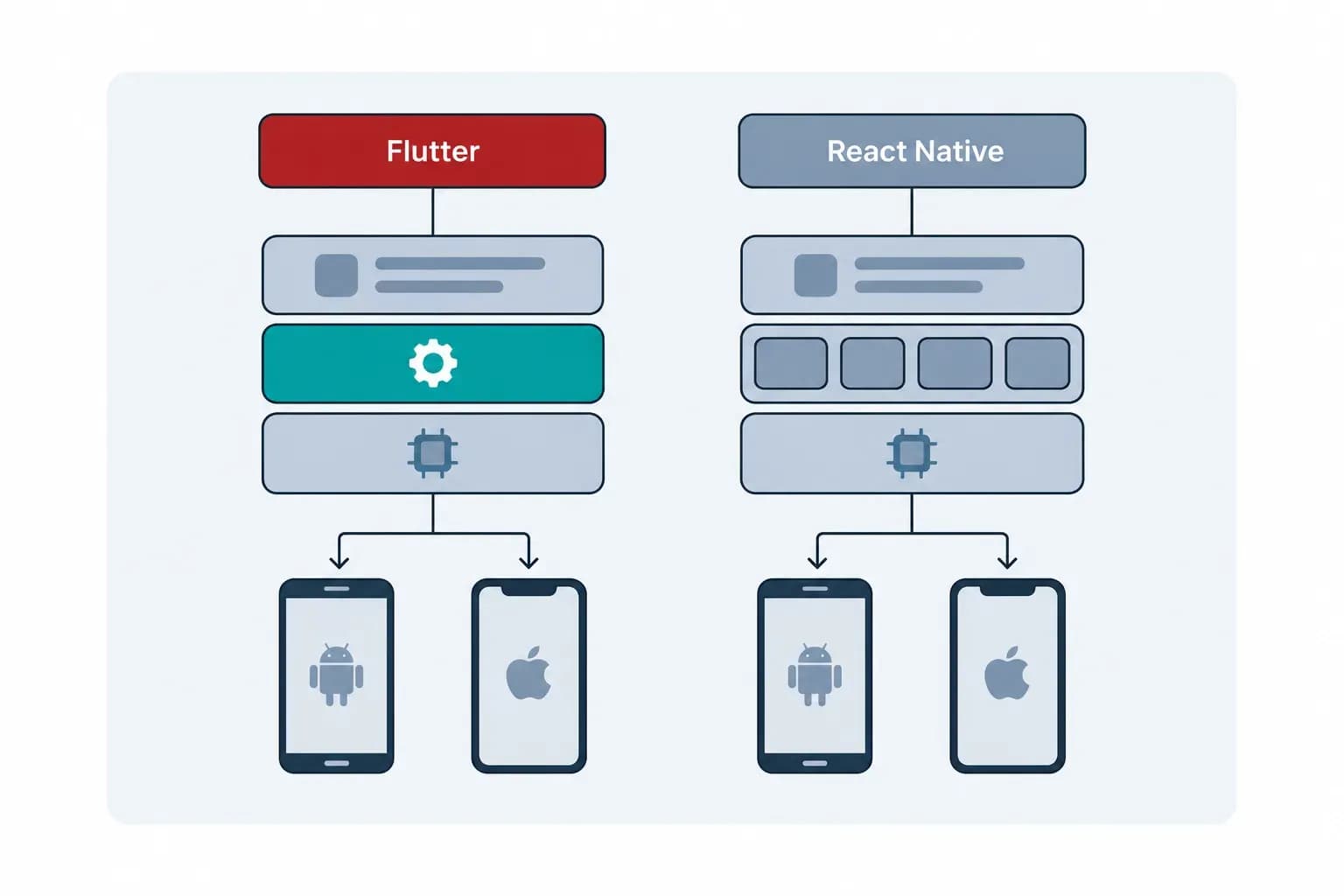
React Native is an open-source framework that uses React and JavaScript, commonly with TypeScript, to build mobile applications. Its core interface components are backed by native Android and iOS views. A text input, for example, connects to a platform text-input component rather than a web page displayed inside the app. See the React Native component documentation.
Flutter is Google's open-source toolkit for building applications using Dart. It supplies its own widget system and draws most of its interface through its rendering engine. On mobile, release applications compile Dart to machine code. Flutter can also integrate native controls and native code where needed; its architectural overview explains those boundaries.
These approaches affect design, integration and maintenance. Neither removes the need to understand Android and iOS when a feature depends on the operating system.
Rendering: platform conventions or a consistent custom interface?
React Native's platform-backed components can be useful when you want behaviour that follows familiar mobile conventions. You still choose navigation, styling and libraries carefully, and custom components still require work. Native components do not automatically make every screen feel right.
Flutter gives developers substantial control over an interface through its own widgets. That can suit a product with a distinctive visual identity, detailed transitions or a design that should remain closely consistent across platforms. Its Material and Cupertino widgets also provide design conventions associated with Android and iOS; choosing Flutter does not require making both versions look identical.
The question is what consistency should mean for your users. An identical interface may support a recognisable brand, while platform-specific behaviour may make text entry, navigation and everyday actions feel more familiar. We would make that choice during design rather than let the framework decide it by accident.
Flutter's rendering description has also changed over time. Google's Impeller documentation identifies Impeller as the supported iOS renderer and the default on supported newer Android devices, with fallback arrangements on other Android hardware. Flutter web uses a different rendering arrangement. A blanket statement that Flutter always uses Skia is outdated.
Performance: test the experience you actually need
Both frameworks can produce responsive applications, and both can produce slow ones. Rendering a short settings screen tells you little about scrolling through thousands of records, processing camera frames or synchronising a large offline database.
React Native's performance guide explains how expensive JavaScript work can delay interaction and how native-thread behaviour differs. It recommends testing performance in release builds because development mode adds overhead. Flutter's performance guidance similarly describes implementation choices that affect rendering cost.
At 60 frames per second, each frame has approximately 16.67 milliseconds available. A framework name cannot tell you whether your particular screen meets that budget on a user's phone. Device age, images, layout complexity, network activity and application code all matter.
A fair comparison should identify the devices, build modes, versions and workload used. We would measure start-up, interaction delays, scrolling, memory and the actual feature that concerns you. We would avoid translating an unrelated demonstration into a promise about your application.
React Native's old bridge is not the current comparison
Some articles still explain React Native entirely through its legacy JavaScript bridge. React Native 0.82, released in October 2025, made the New Architecture mandatory. The official release announcement describes that change.
Older applications may still need migration work, and their libraries may constrain the upgrade. That is a valid maintenance concern. It is different from assuming that a new React Native application necessarily has the architecture described in an old benchmark.
Native integrations can decide the project
A cross-platform framework needs a route into operating-system capabilities and third-party SDKs. Both provide one. React Native supports custom Turbo Native Modules, with typed interfaces and generated native bindings; Flutter supports platform channels and tools such as Pigeon. Their React Native and Flutter guides show how developers implement these connections.
The practical questions concern the exact integration: does a maintained library exist, does it support the required framework version, and does it cover every feature on both platforms? If not, someone needs to own the native implementation.
Consider a hypothetical inspection app that connects to a specialist Bluetooth instrument. A polished dashboard prototype proves very little about connection recovery, firmware differences or background behaviour. We would test the instrument on representative phones before committing to a delivery estimate.
A hypothetical video app creates a different test: recording, processing, exporting and sharing footage at realistic sizes. Again, the relevant SDKs and device behaviour deserve investigation before the easier screens.
This is why we recommend prototyping the hardest feature first. You can explore related considerations through our IoT, systems integration and maps and location capabilities.
Shared code, skills and the existing web application
React Native can be attractive when your organisation already works with React and TypeScript. Developers bring familiarity with component concepts, tools and parts of the language ecosystem. Business rules, validation and API-client code may be reusable when they do not depend on a browser or native platform.
An existing React website does not become a mobile app unchanged. React Native uses different interface components, navigation and device integrations. Its platform-specific code guidance explicitly supports differences between platforms. Reuse should be assessed component by component rather than promised as a percentage in advance.
Flutter offers a coherent Dart and widget approach that may be especially comfortable for an established Flutter team. The commercial advantage comes from the team's ability to deliver and maintain the product, not from learning a language for its own sake.
For a hypothetical company with an experienced React team and a React customer portal, React Native deserves serious consideration. For a company with a healthy Flutter product and a capable Dart team, continuity may be more valuable than changing framework. A rewrite needs a business case that covers migration, regression risk and the features postponed while it happens.
Mobile, desktop and web are separate requirements
Flutter's supported-platform documentation covers Android, iOS, web and desktop targets. React Native's out-of-tree platforms include partner and community implementations for additional targets such as Windows, macOS and web.
That difference matters when desktop is central to your roadmap. However, framework support alone does not establish that your chosen payments, camera or hardware library works on every target. Verify the application’s dependencies as well as its framework.
Screen design also needs adaptation. A warehouse tablet, a mobile phone and a desktop reporting tool have different input methods and working conditions. Shared code can support all three without forcing them into the same layout.
Search visibility changes the web decision
Google's Flutter web FAQ distinguishes application experiences from document-like websites. It explains that Flutter web output is not aligned with what search engines need for indexing and recommends appropriate HTML-based content for marketing and other static pages.
A Flutter customer application can therefore sit alongside a separate, search-friendly website. Equally, React Native Web is a separate implementation choice; it should not be confused with an ordinary React website. Decide how customers discover the business separately from how they use the application after signing in.
Accessibility requires deliberate design and testing
React Native exposes accessibility APIs for Android and iOS, while Flutter supports accessibility semantics and testing tools. The React Native accessibility guide notes differences between platforms. Flutter's accessibility testing guidance includes checks for labels, contrast and touch targets.
Neither framework makes an application accessible merely by being selected. Your delivery plan should cover screen readers, enlarged text, focus order, meaningful labels and the custom controls your design introduces. A beautiful chart that communicates nothing to a screen-reader user remains a product problem.
Test important journeys on real devices and with assistive technologies. That work matters for both frameworks and belongs in the estimate.
Testing and maintenance continue after launch
React Native's testing documentation explains that JavaScript component tests do not execute the native code backing the components. Flutter's testing overview also distinguishes simplified unit and widget environments from integration testing on a device or emulator.
Shared business logic can reduce duplicated testing, but Android and iOS still need relevant device coverage. Authentication, payments, permissions and offline recovery deserve particular attention. Our in-app payments page covers one feature where the surrounding platform rules and behaviour matter.
Both frameworks also evolve. React Native documents upgrade work, including changes around dependencies and native projects. Flutter publishes breaking-change migration guides and SDK and package upgrade instructions.
Ask who will review dependencies, schedule upgrades, monitor crashes and verify new operating-system releases. An estimate that includes only the first launch leaves a significant part of ownership unanswered.
Hot reload and production updates are different
Hot reload helps developers see changes while building an application. It is separate from distributing a change to customers.
In a React Native application configured for Expo EAS Update, compatible JavaScript and asset changes can be delivered through its update system. Expo's runtime-version documentation explains that native code cannot change through such an update and that changes to the native layer require a new build. Compatibility, testing and rollout management remain necessary.
Treat production update capability as a property of the delivery setup. Ask exactly which changes it covers, how changes are tested and how a failed release is recovered. It should never become a promise that every future feature avoids a new binary or store process.
How we would make the decision with you
We would first document the required platforms, user journeys, integrations and quality constraints. Then we would assess existing code and team capability, test the most uncertain native feature, and compare the cost of delivering and maintaining credible options.
React Native often fits our delivery approach because we use it and can support its surrounding JavaScript and TypeScript ecosystem. Flutter deserves consideration where its rendering approach, an existing codebase, team expertise or wider platform requirements offer a better fit. For an established application, improving what you have may be the most sensible recommendation.
The useful output is a reasoned choice tied to your product, with known risks and a plan for resolving them. Contact Scorchsoft if you want to assess that choice before committing to an app build or rewrite.
Frequently asked questions
Both can support a serious business application. The better choice depends on existing code, team expertise, required platforms, design and native integrations. Scorchsoft uses React Native, but an established Flutter product or experienced Dart team can make Flutter the more sensible choice.
There is no reliable universal answer. Devices, build settings, versions and workloads change results. Test representative release builds against the experience your users need.
Some platform-independent business logic, validation and API-client code may be reusable. Website interface components and browser-dependent code usually require adaptation. Assess reuse in the actual codebase.
Only when a clear business case justifies migration and regression risk. A healthy Flutter application may be best improved in place. Review its code, dependencies, integrations and roadmap first.
Terms used in this guide
Sources referenced
- —React Native component documentation
- —architectural overview
- —Google's Impeller documentation
- —performance guide
- —performance guidance
- —official release announcement
- —React Native
- —Flutter
- —platform-specific code guidance
- —supported-platform documentation
- —out-of-tree platforms
- —Flutter web FAQ
- —React Native accessibility guide
- —accessibility testing guidance
- —testing documentation
- —testing overview
- —upgrade work
- —breaking-change migration guides
- —SDK and package upgrade instructions
- —Expo's runtime-version documentation
Choose the right approach for your app
Discuss your requirements with Scorchsoft and assess the delivery options.

About the author
Andrew Ward
Managing Director
Andrew Ward is the founder and Managing Director of Scorchsoft and author of The Control Standard, Execute Your Tech Idea and The ChatGPT Guide for Business. With more than sixteen years of experience building software and running a business, he writes about practical ways to apply technology, use AI and lead teams that deliver.
Andrew holds a first-class degree in Computer Science with Business Management from the University of Birmingham and has represented Great Britain in bench press, winning world championship bronze in 2023.
Want to talk about your project?
Tell us what you’re trying to achieve and we’ll map the fastest credible path.